Guía para Python
Con nuestro SDK de Python, puede implementar el háptico en su proyecto de Python.
- Instalar el paquete
- Configurar el entorno háptico
Requisitos
- SO: Windows 10/11 (x64), macOS (Apple Silicon)
- Python 3.8 - 3.12
- bHaptics Player instalado y en ejecución
- Aplicación háptica desplegada correspondiente a su proyecto
- App ID y API Key de la aplicación háptica
About haptic application
You can create and manage haptic apps in Developer Portal, a web-based tool.
If you're unfamiliar with haptic apps or haven't created one yet, please follow the Portal guide before proceeding.
Before linking a haptic app to your game project, make sure the haptic app meets the following requirements:
- At least one haptic event must be created.
- API Key must be generated.
- There is no API Key by default. To generate one, go to the "API Key" tab and click "New" button.
- Haptic app must be deployed
- If you see "Deploy Now" button in the upper right corner, click it to deploy your haptic app. Otherwise, if you can see "Up to date", it means that the latest haptic app has already been deployed.
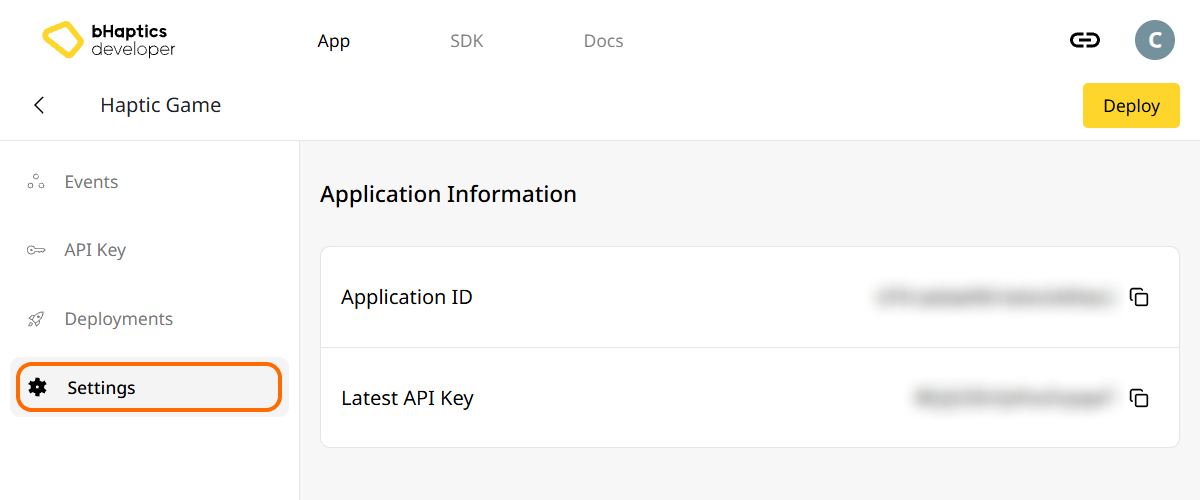
Also, link process requires App ID and API Key. Go to the "Settings" tab, and check the App ID and API Key.
Instalación
Instale el SDK de Python de bHaptics mediante pip desde PyPI:
pip install bhaptics-python
Importar paquetes
# bHaptics SDK
import bhaptics_python

# Coroutine
import asyncio
También debe importar el paquete asyncio, ya que la mayoría de las funciones son corrutinas.
Configurar el entorno háptico
Antes de usar cualquier función relacionada con hápticos, debe vincular la aplicación háptica a su proyecto e inicializar el entorno háptico.
Para ello, necesita el App ID y la API Key de su aplicación háptica. Puede obtenerlos en el bHaptics Developer Portal.
Inicializar
- Reemplace
"your_app_id"y"your_api_key"por su App ID y su API Key. - Antes de ejecutar el script de Python, asegúrese de que la aplicación bHaptics Player esté en ejecución en su computadora.
import bhaptics_python
import asyncio

async def main():
    app_id = "your_app_id"        # Replace with your App ID
    api_key = "your_api_key"      # Replace with your API key

    # Initialize SDK
    result = await bhaptics_python.registry_and_initialize(app_id, api_key, "")
    print(f"Initialization result: {result}")

    # Example: Play a haptic event
    event_name = "your_event_name"
    request_id = await bhaptics_python.play_event(event_name)
    print(f"Playing event: {event_name}, Request ID: {request_id}")

asyncio.run(main())
Acerca del índice de dispositivo
El SDK de bHaptics admite el control de múltiples dispositivos simultáneamente. Puede dirigirse a todos los dispositivos o a dispositivos específicos usando el sistema de índice de dispositivo.
Todos los dispositivos hápticos tienen su propio índice de dispositivo. De forma predeterminada, el índice de dispositivo se establece en -1. Puede modificar el índice de dispositivo a través de bHaptics Player.
- Todos los dispositivos: las funciones sin el parámetro
device_indexafectan a todos los dispositivos no modificados (cuyo índice de dispositivo es-1). - Dispositivo específico: las funciones con el parámetro
device_indexse dirigen a un dispositivo específico.
# Affect all unmodified devices.
await bhaptics_python.play_event(event_name)

# Affect only devices that device index is 0.
await bhaptics_python.play_event(event_name, 0)
Puede consultar o establecer los índices de dispositivo en bHaptics Player.
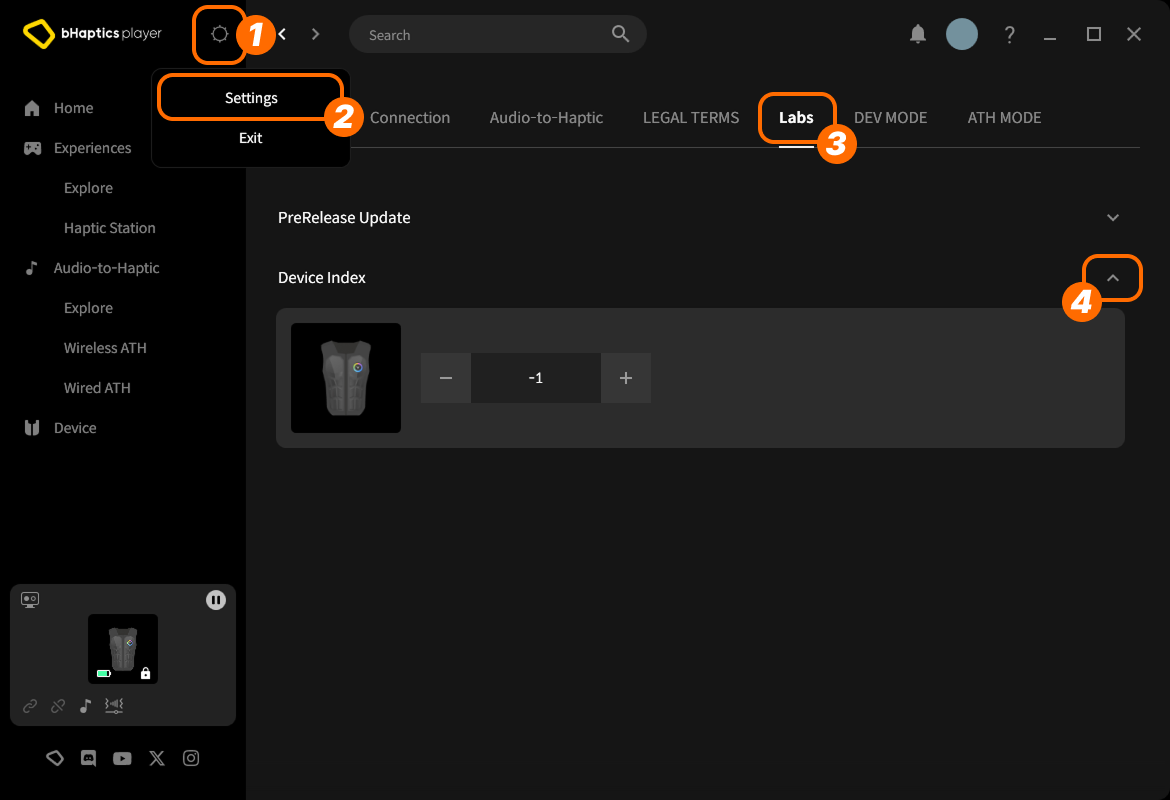
- En la parte superior derecha, haga clic en el ícono de configuración.
- Haga clic en "Settings".
- Vaya a la pestaña "Labs".
- Expanda "Device Index".
Luego encuentre el dispositivo en la lista y ajuste el índice haciendo clic en "+" o "-".
Acerca del tipo de dispositivo
Los distintos tipos de dispositivo tienen distintos rangos. Úselo cuando necesite hápticos para una parte específica del cuerpo.
| Valor | Dispositivo | Colocado en... | Cantidad de motores |
|---|---|---|---|
0 | TactSuit Pro | Cuerpo superior | 32 |
1 | TactSleeve(Left) | Muñeca izquierda | 3 |
2 | TactSleeve(Right) | Muñeca derecha | 3 |
3 | TactVisor | Cabeza | 4 |
4 | Tactosy for Hands(Left) | Mano izquierda | 3 |
5 | Tactosy for Hands(Right) | Mano derecha | 3 |
6 | Tactosy for Feet(Left) | Pie izquierdo | 3 |
7 | Tactosy for Feet(Right) | Pie derecho | 3 |
8 | TactGlove(Left) | Mano izquierda | 8 |
9 | TactGlove(Right) | Mano derecha | 8 |
El valor del tipo de dispositivo es usado por la función háptica que no utiliza el evento, sino que especifica directamente la intensidad de vibración de los motores.
device_type = 0    # TactSuit Pro
motors_count = 32  # TactSuit Pro has 32 motors

strength = 50      # 50% strength
duration = 400     # 400 milliseconds

await bhaptics_python.play_dot(device_type, duration, [strength] * motors_count)
Lectura adicional
¡Ya está listo para usar la función háptica de bHaptics! Visite nuestra Referencia de Python para reproducir hápticos en su proyecto, o consulte el código de ejemplo completo a continuación.
Si tiene problemas para usar esta biblioteca, consulte Solución de problemas.
Código de ejemplo completo
import bhaptics_python
import asyncio
import time

async def haptic_demo():
    # 1. Initialization
    app_id = "your_app_id"
    api_key = "your_api_key"

    print("🔧 Initializing bHaptics SDK...")
    result = await bhaptics_python.registry_and_initialize(app_id, api_key, "")
    print(f"Initialization result: {result}")

    print("✅ Connected to bHaptics Player.")

    # 2. Check device information
    device_info = await bhaptics_python.get_device_info_json()
    print(f"📱 Connected device info: {device_info}")

    # 3. Test haptic effects
    print("\n🎮 Starting haptic effect tests...")

    # Play dot pattern
    print("• Playing dot pattern")
    values = [50] * 16 + [0] * 16  # Activate first 16 of 32 motors
    await bhaptics_python.play_dot(0, 2000, values)
    await asyncio.sleep(2.5)

    # Play path pattern
    print("• Playing path pattern")
    x = [0.2, 0.4, 0.6, 0.8]
    y = [0.2, 0.8, 0.2, 0.8]
    intensity = [80, 60, 80, 60]
    await bhaptics_python.play_path(0, 3000, x, y, intensity)
    await asyncio.sleep(3.5)

    # Test glove haptics (if available)
    print("• Testing glove haptics")
    glove_motors = [100] * 8
    glove_playtimes = [500] * 8
    glove_shapes = [2] * 8

    # Left hand
    await bhaptics_python.play_glove(8, glove_motors, glove_playtimes, glove_shapes, 0)
    await asyncio.sleep(1)

    # Right hand
    await bhaptics_python.play_glove(9, glove_motors, glove_playtimes, glove_shapes, 0)
    await asyncio.sleep(1)

    # 4. Cleanup
    await bhaptics_python.stop_all()
    await bhaptics_python.close()
    print("🔚 Demo completed")

# Run the demo
if __name__ == "__main__":
    asyncio.run(haptic_demo())
Si desea explorar más ejemplos, consulte el README del repositorio oficial de GitHub.
Manejo de errores
En aplicaciones de producción, envuelva siempre las llamadas al SDK en bloques try-catch:
try:
    result = await bhaptics_python.registry_and_initialize(app_id, api_key, "")
    if not result:
        print("Failed to initialize bHaptics SDK")
except Exception as e:
    print(f"Error initializing SDK: {e}")