JavaScript ガイド
JavaScript SDK を使用すると、JS/TS プロジェクトにハプティックを実装できます。TypeScript 向けの型システムと ESM もサポートしています。
- パッケージのインストール
- ハプティック環境のセットアップ
要件
- Node.js(最新の LTS バージョンを推奨)
- OS: Windows 10/11 (x64)、macOS (Apple Silicon)
- bHaptics Player のインストールと実行
- プロジェクトに対応するデプロイ済みの ハプティックアプリケーション
- ハプティックアプリの App ID と API Key
tact-js は ブラウザ でのみ実行されます。Vite などのツールでバンドルされた Web アプリ内で使用してください。
About haptic application
You can create and manage haptic apps in Developer Portal, a web-based tool.
If you're unfamiliar with haptic apps or haven't created one yet, please follow the Portal guide before proceeding.
Before linking a haptic app to your game project, make sure the haptic app meets the following requirements:
- At least one haptic event must be created.
- API Key must be generated.
- There is no API Key by default. To generate one, go to the "API Key" tab and click "New" button.
- Haptic app must be deployed
- If you see "Deploy Now" button in the upper right corner, click it to deploy your haptic app. Otherwise, if you can see "Up to date", it means that the latest haptic app has already been deployed.
Also, link process requires App ID and API Key. Go to the "Settings" tab, and check the App ID and API Key.
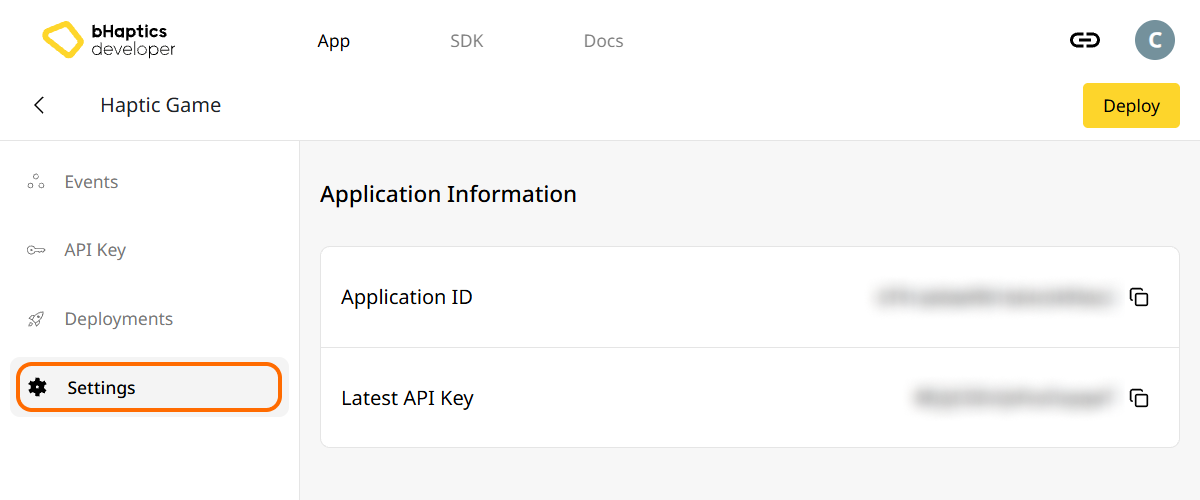
インストール
- npm
- yarn
- pnpm
npm install tact-js
yarn add tact-js
pnpm add tact-js
パッケージのインポート
import Tact from "tact-js";
最適化対象からの除外
Vite を使用している場合は、Vite 設定ファイルに以下を追加してください。
export default defineConfig({
  // ...
  optimizeDeps: {
    exclude: ['tact-js'],
  },
  // ...
});
ハプティック環境のセットアップ
ハプティック関連の関数を使用する前に、ハプティックアプリをプロジェクトに連携し、ハプティック環境を初期化する必要があります。
そのためには、ハプティックアプリの App ID と API Key が必要です。これらは bHaptics Developer Portal から取得できます。
初期化
"your_app_id"と"your_api_key"をご自身の App ID と API Key に置き換えてください。- JavaScript プロジェクトを起動する前に、bHaptics Player アプリケーションがコンピューター上で実行されていることを確認してください。
import Tact from "tact-js";

const initTact = async () => {
  const result = await Tact.init({
    appId: "your_app_id",
    apiKey: "your_api_key",
  });

  console.log(result ? "Connection Success!" : "Connection Failed...");
}
さらに読む
これで bHaptics のハプティック機能を使用する準備が整いました!プロジェクトでハプティックを再生するには JavaScript リファレンスをご覧いただくか、以下の完全なサンプルコードを参考にしてください。
このライブラリの使用で問題が発生した場合は、トラブルシューティングを確認してください。
完全なサンプルコード
tact-js はブラウザで実行されるため、以下のサンプルでは Vite を使用しています。ページを開く前に bHaptics Player が実行中であることを確認してください。
<!doctype html>
<html lang="en">
  <head>
    <meta charset="UTF-8" />
    <title>bHaptics tact-js example</title>
  </head>
  <body>
    <button id="play">Play haptic</button>
    <pre id="log"></pre>
    <script type="module" src="/src/main.js"></script>
  </body>
</html>
import Tact, { PositionType } from "tact-js";

// Replace with your App ID and API Key from the bHaptics Developer Portal.
const APP_ID = "your_app_id";
const API_KEY = "your_api_key";

const logEl = document.getElementById("log");
const log = (msg) => {
  console.log(msg);
  logEl.textContent += msg + "\n";
};

const sleep = (ms) => new Promise((resolve) => setTimeout(resolve, ms));

let ready = false;

// 1. Initialize on load. bHaptics Player must already be running.
const initialize = async () => {
  log("Initializing bHaptics SDK...");
  ready = await Tact.init({ appId: APP_ID, apiKey: API_KEY });
  log(ready ? "Connected to bHaptics Player." : "Failed to connect. Is bHaptics Player running?");

  if (ready) {
    const devices = await Tact.getConnectedDevices();
    log(`Connected devices: ${JSON.stringify(devices)}`);
  }
};

// 2. Run a short haptic sequence when the button is clicked.
const runDemo = async () => {
  if (!ready) {
    log("SDK is not ready yet.");
    return;
  }

  // Play dot pattern — first 16 of the TactSuit Pro's 32 motors.
  log("- Playing dot pattern");
  const motorValues = [...Array(16).fill(50), ...Array(16).fill(0)];
  await Tact.playDot({ position: PositionType.Vest, motorValues, duration: 2000 });
  await sleep(2500);

  // Play path pattern.
  log("- Playing path pattern");
  await Tact.playPath({
    position: PositionType.Vest,
    x: [0.2, 0.4, 0.6, 0.8],
    y: [0.2, 0.8, 0.2, 0.8],
    intensity: [80, 60, 80, 60],
    duration: 3000,
  });
  await sleep(3500);

  // Play glove waveform on both hands (if connected).
  log("- Testing glove haptics");
  const motors = new Int32Array([100, 0, 0, 0, 0, 100, 0, 100]);
  const playtimes = new Int32Array([8, 0, 0, 0, 0, 1, 0, 4]);
  const shapes = new Int32Array([2, 0, 0, 0, 0, 0, 0, 0]);
  await Tact.playGlove({ position: PositionType.GloveL, motors, playtimes, shapes, repeatCount: 1 });
  await sleep(1000);
  await Tact.playGlove({ position: PositionType.GloveR, motors, playtimes, shapes, repeatCount: 1 });
  await sleep(1000);

  await Tact.stopAll();
  log("Demo completed");
};

document.getElementById("play").addEventListener("click", runDemo);

initialize();
より多くのサンプルを確認したい場合は、公式 GitHub リポジトリの README を確認してください。