リファレンス
tact-js パッケージは、JavaScript から bHaptics ハプティックデバイスを制御する関数を提供します。ハプティックパターンの再生、デバイスモーターの直接制御、ハプティック再生の管理を行えます。
import Tact from "tact-js";
イベントベースのハプティック再生
特定のイベントにバインドされたハプティックパターン(bHaptics Designer/Portal でデザイン)を再生します。ほとんどのアプリケーションで推奨される関数です。
play
play({ eventKey, startTime, intensityRatio, durationRatio, offsetX, offsetY, deviceIndex }: PlayParams): Promise<void>;

type PlayParams = {
  eventKey: string;         // Name of the haptic event
  startTime?: number;       // Playback start position in milliseconds
  intensityRatio?: number;  // Intensity multiplier [0.0 - 2.0]
  durationRatio?: number;   // Duration multiplier
  offsetX?: number;         // Rotation offset [0.0 - 360.0]
  offsetY?: number;         // Vertical offset [-0.5 - 0.5]
  deviceIndex?: number;     // Target device index
};
あらかじめ定義されたハプティックイベントを再生します。
パラメータ
eventKey: ハプティックイベントの名前。startTime(任意): 再生開始位置(ミリ秒単位) — イベントの最初のstartTimeミリ秒はスキップされます。例えば、3,260ms のイベントをstartTime: 2000で再生すると、最後の 1,260ms だけが再生されます。(デフォルト:0)intensityRatio(任意): ハプティック Intensity の倍率。有効範囲: [0.0-2.0](デフォルト:1.0)durationRatio(任意): Duration の倍率。(デフォルト:1.0)offsetX(任意): ハプティックを反時計回りに回転します。有効範囲: [0.0-360.0](デフォルト:0.0)offsetY(任意): ハプティックを上または下に移動します。有効範囲: [-0.5-0.5](デフォルト:0.0)deviceIndex(任意): 同じポジションタイプのデバイスが複数接続されている場合に、対象とするデバイスのインデックス。(デフォルト:-1、特定のデバイスを指定しない)
戻り値
リクエストが bHaptics Player に送信されると、プロミスは値なし(undefined)で解決されます。
イベントキーが登録されていない場合でも正常に解決される点に注意してください — この場合は何も再生されず、エラーもスローされません。イベントキーが存在するかどうかは getEvent で確認してください。
例
import Tact from "tact-js";

const playExample = async () => {
  await Tact.play({ eventKey: "heartbeat" });
};

const playMoreExample = async () => {
  await Tact.play({
    eventKey: "hit",
    startTime: 0,
    intensityRatio: 1.0,
    durationRatio: 1.0,
    offsetX: 180.0,
    offsetY: 0.25,
  });
};
playLoop
playLoop({ eventKey, intensityRatio, durationRatio, interval, maxCount, offsetX, offsetY, deviceIndex }: PlayLoopParams): Promise<number>;

type PlayLoopParams = {
  eventKey: string;        // Name of the haptic event
  intensityRatio?: number; // Intensity multiplier [0.0 - 2.0]
  durationRatio?: number;  // Duration multiplier
  interval: number;        // Pause between repetitions (milliseconds)
  maxCount: number;        // Total number of plays
  offsetX: number;         // Rotation offset [0.0 - 360.0]
  offsetY: number;         // Vertical offset [-0.5 - 0.5]
  deviceIndex?: number;    // Target device index
};
ハプティックイベントを指定した回数だけ繰り返し再生します。
パラメータ
eventKey: ハプティックイベントの名前。intensityRatio(任意): ハプティック Intensity の倍率。有効範囲: [0.0-2.0](デフォルト:1.0)durationRatio(任意): Duration の倍率。(デフォルト:1.0)interval: 繰り返しの間の一時停止時間(ミリ秒)。ある再生の終わりから次の再生の開始までを基準に測定されます。例えば、460ms のイベントをinterval: 500、maxCount: 3で再生すると、約 2,380ms(460 + 500 + 460 + 500 + 460)後に終了します。maxCount: ハプティックイベントを再生する合計回数(最初の再生を含む)。1未満の値は1として動作します。offsetX: ハプティックを反時計回りに回転します。有効範囲: [0.0-360.0](デフォルト:0.0)offsetY: ハプティックを上または下に移動します。有効範囲: [-0.5-0.5](デフォルト:0.0)deviceIndex(任意): 同じポジションタイプのデバイスが複数接続されている場合に、対象とするデバイスのインデックス。(デフォルト:-1、特定のデバイスを指定しない)
戻り値
この再生リクエストを識別するリクエスト ID。
イベントキーが登録されていない場合でもリクエスト ID が返される点に注意してください — この場合は何も再生されません。繰り返し再生中のイベントを停止するには、イベントキーを指定して stop を呼び出すか、stopAll を使用してください。
繰り返し再生が進行している間、isPlayingByEventKey は繰り返しの間の interval 一時停止区間を含む全区間で true を返します。
例
import Tact from "tact-js";

const playLoopExample = async () => {
  const requestId = await Tact.playLoop({
    eventKey: "hit",
    intensityRatio: 1.0,
    durationRatio: 1.0,
    interval: 1000,
    maxCount: 5,
    offsetX: 0.0,
    offsetY: 0.0,
  });

  console.log(`Playback request ID: ${requestId}`);
};
ハプティックの直接再生
イベントを使わずにハプティックを再生したい場合は、これらの関数を使用してください。
playDot
playDot({ position, motorValues, duration, deviceIndex }: PlayDotParams): Promise<number>;

type PlayDotParams = {
  position: PositionType;  // Device position type
  motorValues: number[];   // Array of motor intensity values [0 - 100]
  duration?: number;       // Duration in milliseconds
  deviceIndex?: number;    // Target device index
};
特定のハプティックアクチュエーターでハプティックフィードバックを再生します。
パラメータ
position: 再生するハプティックデバイスのタイプ。PositionTypeenum を参照してください。motorValues: 各モーターの Intensity 値の配列。配列の長さはデバイスのモーター数と一致する必要があります。各値は整数で、範囲内である必要があります。有効範囲: [0-100]。duration(任意): ハプティックフィードバックの Duration(ミリ秒単位)。100以上を推奨します。deviceIndex(任意): 同じポジションタイプのデバイスが複数接続されている場合に、対象とするデバイスのインデックス。(デフォルト:-1、特定のデバイスを指定しない)
戻り値
この再生リクエストを識別するリクエスト ID。再生を停止するには stopAll を使用してください。
パラメータはクライアント側で検証されない点に注意してください — 例えば motorValues の長さが誤っていたり、範囲外の値が含まれていたりする場合でもリクエスト ID が返され、この場合はハプティックが再生されないことがあります。
例
import Tact, { PositionType } from "tact-js";

const playDotExample = async () => {
  const requestId = await Tact.playDot({
    position: PositionType.ForearmL,  // Left TactSleeve
    motorValues: [100, 80, 60],       // TactSleeve has 3 motors
    duration: 100
  });

  console.log(`Playback request ID: ${requestId}`);
}
playPath
playPath({ position, x, y, intensity, duration, deviceIndex }: PlayPathParams): Promise<number>;

type PlayPathParams = {
  position: PositionType;  // Device position type
  x: number[];             // Array of x coordinates [0.0 - 1.0]
  y: number[];             // Array of y coordinates [0.0 - 1.0]
  intensity: number[];     // Array of intensity values [0 - 100]
  duration?: number;       // Duration in milliseconds
  deviceIndex?: number;    // Target device index
};
指定した座標に沿ってハプティックフィードバックを再生します。個々のモーターを制御する playDot とは異なり、このメソッドはデバイス上の特定の座標に対するハプティック Intensity を指定します。
ハプティックの位置を指定する際、playDot は離散的な制御を提供するのに対し、playPath はより連続的です。playDot は個々のアクチュエーターに Intensity を割り当てるのに対し、playPath は特定の座標(X 軸と Y 軸の両方で 0 から 1 の間)に対する Intensity の指定が可能で、周辺のアクチュエーターがそれに応じて振動します。
複数の座標と複数の Intensity を一緒に指定できます。リスト内のこれらの座標の周辺にあるすべてのアクチュエーターは、順次ではなく同時に作動する点に注意してください。すべての配列(x、y、intensity)のサイズは同じである必要があります。
x、y、intensity の配列の長さが異なると、SDK 内部の WebAssembly モジュールが回復不能なエラーでクラッシュします(tact-js 2.0.4 で確認済み) — ページを再読み込みするまでハプティックが動作しなくなります。呼び出す前に、3 つの配列の長さが同じであることを必ず確認してください。
値を徐々に変化させながらこの関数を継続的に呼び出すことで、ハプティックポイントが移動するエフェクトを実現できます。
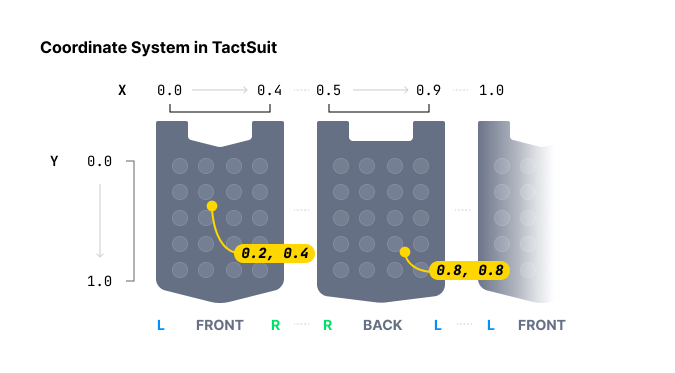
パラメータ
position: 再生するハプティックデバイスのタイプ。PositionTypeenum を参照してください。x: ハプティックエフェクトの X 座標の配列。各値の範囲: [0.0-1.0]y: ハプティックエフェクトの Y 座標の配列。各値の範囲: [0.0-1.0]intensity: 各座標に対する Intensity 値の配列。各値は整数で、範囲内である必要があります: [0-100]duration(任意): ハプティックフィードバックの Duration(ミリ秒単位)。100以上を推奨します。deviceIndex(任意): 同じポジションタイプのデバイスが複数接続されている場合に、対象とするデバイスのインデックス。(デフォルト:-1、特定のデバイスを指定しない)
戻り値
この再生リクエストを識別するリクエスト ID。再生を停止するには stopAll を使用してください。
例
import Tact, { PositionType } from "tact-js";

const HAPTIC_PATHS = [
  {
    x: [0.738, 0.723, 0.709, 0.696, 0.682, 0.667, 0.653],
    y: [0.680, 0.715, 0.749, 0.782, 0.816, 0.852, 0.885],
    intensity: 20
  },
  {
    x: [0.061, 0.072, 0.102, 0.184, 0.254, 0.310, 0.363],
    y: [0.632, 0.587, 0.542, 0.498, 0.411, 0.366, 0.301],
    intensity: 60
  }
];

const TIME_OF_FRAME = 250; // milliseconds

const playPathExample = async () => {
  const frames = HAPTIC_PATHS[0].x.length;

  for (let i = 0; i < frames; i++) {
    await Tact.playPath({
      position: PositionType.Vest, // TactSuit Pro
      x: HAPTIC_PATHS.map(point => point.x[i]),
      y: HAPTIC_PATHS.map(point => point.y[i]),
      intensity: HAPTIC_PATHS.map(point => point.intensity),
      duration: TIME_OF_FRAME
    });
    await new Promise(resolve => setTimeout(resolve, TIME_OF_FRAME));
  }
}
playGlove
playGlove({ position, motors, playtimes, shapes, repeatCount }: PlayGloveParams): Promise<number>;

type PlayGloveParams = {
  position: PositionType;  // GloveL or GloveR
  motors: Int32Array;      // Array of 8 motor intensity values [0 - 100]
  playtimes: Int32Array;   // Array of 8 time interval values
  shapes: Int32Array;      // Array of 8 waveform values
  repeatCount: number;     // Number of times to play the pattern
};
TactGlove 専用。 Duration と Intensity のパターンを細かく制御しながら、TactGlove でハプティックを再生します。playDot よりも詳細な制御が可能です。
各配列パラメータは、グローブの各モーターに対応する正確に 8 個の要素を持つ必要があります。
パラメータ
-
position: 再生するハプティックデバイスのタイプ。必ずPositionType.GloveLまたはPositionType.GloveRを使用する必要があります。 -
motors: 各モーターの Intensity を表す 8 個の値からなる配列。各値は整数で、範囲内である必要があります: [0-100]配列インデックス モーターの位置 0親指の先 1人差し指の先 2中指の先 3薬指の先 4小指の先 5手首 6手のひら(親指側) 7手のひら(小指側) -
playtimes: 8 個の作動時間間隔の値からなる配列。有効な値は次のとおりです:Value Duration 15ms 210ms 420ms 630ms 840ms -
shapes: 時間に応じた Intensity の変化を制御する 8 個の波形値からなる配列:Value 波形パターン 0Duration の間、一定の Intensity 1指定した Intensity から始まり、半分まで減少 2半分の Intensity から始まり、最大の Intensity まで増加 -
repeatCount: 8 モーターのパターンを再生する合計回数(最初の再生を含む)。
戻り値
この再生リクエストを識別するリクエスト ID。再生を停止するには stopAll を使用してください。
例
import Tact, { PositionType } from "tact-js";

const playGloveExample = async () => {
  const motors = new Int32Array([100, 100, 100, 100, 100, 100, 100, 100]);
  const playtimes = new Int32Array([8, 8, 8, 8, 8, 8, 8, 8]);
  const shapes = new Int32Array([2, 2, 2, 2, 2, 2, 2, 2]);

  const requestId = await Tact.playGlove({
    position: PositionType.GloveR,
    motors,
    playtimes,
    shapes,
    repeatCount: 3
  });

  console.log(`Playback request ID: ${requestId}`);
}
再生制御
pause
pause(eventKey: string): Promise<void>
現在再生中の特定のハプティックイベントを一時停止します。
パラメータ
eventKey: 一時停止するハプティックイベントの名前。
例
import Tact from "tact-js";

const playAndPauseExample = async () => {
  await Tact.play({ eventKey: "dash" });
  await new Promise(resolve => setTimeout(resolve, 1000));
  await Tact.pause("dash");
}
resume
resume(eventKey: string): Promise<void>
以前に一時停止されたハプティックイベントを再開します。
パラメータ
eventKey: 再開するハプティックイベントの名前。
例
import Tact from "tact-js";

const playPauseAndResumeExample = async () => {
  await Tact.play({ eventKey: "dash" });
  await new Promise(resolve => setTimeout(resolve, 1000));
  await Tact.pause("dash");
  await new Promise(resolve => setTimeout(resolve, 1000));
  await Tact.resume("dash");
}
stop
stop(eventKey: string): Promise<void>
特定のハプティックイベントを完全に停止します。
パラメータ
eventKey: 停止するハプティックイベントの名前。
例
import Tact from "tact-js";

const stopExample = async () => {
  await Tact.play({ eventKey: "dash" });
  await new Promise(resolve => setTimeout(resolve, 1000));
  await Tact.stop("dash");
}
stopAll
stopAll(): Promise<void>
現在再生中のすべてのハプティックを停止します。
例
import Tact from "tact-js";

const stopAllExample = async () => {
  await Tact.play({ eventKey: "dash" });
  await Tact.play({ eventKey: "heartbeat" });
  await Tact.play({ eventKey: "hit" });
  await Tact.play({ eventKey: "slash" });
  await new Promise(resolve => setTimeout(resolve, 500));

  await Tact.stopAll();
}
ライフサイクル
init
init({ appId, apiKey }: InitParams): Promise<boolean>;

type InitParams = {
  appId: string;   // Your bHaptics App ID
  apiKey: string;  // Your bHaptics API Key
};
bHaptics SDK を初期化します。この関数は、SDK の他の関数を使用する前に必ず呼び出す必要があります。SDK を初期化し、bHaptics Player との接続を確立します。
パラメータ
appId: bHaptics Developer Portal から取得した bHaptics アプリケーション IDapiKey: bHaptics Developer Portal から取得した bHaptics API キー
戻り値
初期化に成功した場合は true、それ以外の場合は false を返します。
例
import Tact from "tact-js";

const initTact = async () => {
  const result = await Tact.init({
    appId: "your-app-id",
    apiKey: "your-api-key",
  });

  console.log(result ? "Connection Success!" : "Connection Failed...");
}
ステータス確認
getConnectedDevices
getConnectedDevices(): Promise<any[]>
接続されているすべてのハプティックデバイスのリストを取得します。
戻り値
接続されているデバイスオブジェクトの配列。接続されているデバイスがない場合は空の配列([])を返します。各オブジェクトは次のフィールドを持ちます:
| Field | Type | Description |
|---|---|---|
position | number | デバイスの数値ポジション: 0 Vest、1 ForearmL、2 ForearmR、3 Head、4 HandL、5 HandR、6 FootL、7 FootR、8 GloveL、9 GloveR。PositionUtils.positionToType(position) を使用すると PositionType に変換できます。 |
deviceName | string | デバイスの表示名(例: "TactGlove (L)")。 |
address | string | デバイスの MAC アドレス。ping と一緒に使用します。 |
connected | boolean | デバイスが現在接続されているかどうか。 |
paired | boolean | デバイスが bHaptics Player にペアリングされているかどうか。 |
battery | number | バッテリー残量(パーセント)。 |
audioJackIn | boolean | オーディオジャックが差し込まれているかどうか(オーディオアクセサリーデバイス)。 |
vsm | number | bHaptics Player で設定された振動の強さの値。 |
戻り値の例は次のとおりです:
[
    {
        "position": 8,
        "deviceName": "TactGlove (L)",
        "address": "F418EB165E99",
        "connected": true,
        "paired": true,
        "battery": 91,
        "audioJackIn": false,
        "vsm": 20
    },
    {
        "position": 9,
        "deviceName": "TactGlove (R)",
        "address": "DF8B33412EC5",
        "connected": true,
        "paired": true,
        "battery": 84,
        "audioJackIn": false,
        "vsm": 20
    }
]
例
import Tact from "tact-js";

const showDevicesExample = async () => {
  const devices = await Tact.getConnectedDevices();
  console.log("Connected devices:", devices);
}
getHapticMappings
getHapticMappings(): Promise<any[]>
現在のハプティックアプリケーションに登録されているすべてのハプティックイベント(bHaptics Developer Portal からデプロイ)のリストを取得します。
戻り値
ハプティックマッピングオブジェクトの配列。各オブジェクトは次のフィールドを持ちます:
| Field | Type | Description |
|---|---|---|
eventName | string | イベントキー。play およびその他のイベントベースの関数と一緒に使用します。 |
eventTime | number | イベントの Duration(ミリ秒単位)。 |
戻り値の例は次のとおりです:
[
    {
        "eventName": "punch-recoil",
        "eventTime": 180
    },
    {
        "eventName": "dash",
        "eventTime": 3260
    },
    {
        "eventName": "teleport",
        "eventTime": 460
    }
]
例
import Tact from "tact-js";

const showMappingsExample = async () => {
  const mappings = await Tact.getHapticMappings();

  for (const mapping of mappings) {
    console.log(`${mapping.eventName}: ${mapping.eventTime}ms`);
  }
}
getEvent
getEvent(eventKey: string): Promise<number>
登録されているハプティックイベントの Duration を取得します。
パラメータ
eventKey: 照会するハプティックイベントの名前。
戻り値
イベントの Duration(ミリ秒単位)。イベントキーが登録されていない場合は 0 を返します — play を呼び出す前にイベントキーが存在するかどうかを確認するのに使用できます。
例
import Tact from "tact-js";

const getEventExample = async () => {
  const duration = await Tact.getEvent("dash");

  if (duration > 0) {
    console.log(`dash is ${duration}ms long`);
  } else {
    console.log("dash is not registered");
  }
}
isDeviceConnected
isDeviceConnected(position: PositionType): Promise<boolean>
特定のデバイスタイプが接続されているかどうかを確認します。
パラメータ
position: 再生するハプティックデバイスのタイプ。PositionTypeenum を参照してください。
戻り値
該当するデバイスタイプが接続されている場合は true、それ以外の場合は false。
例
import Tact, { PositionType } from "tact-js";

const isDeviceConnectedExample = async () => {
  const isGloveConnected = await Tact.isDeviceConnected(PositionType.GloveR);
  console.log("Right TactGlove connected:", isGloveConnected);
}
isConnected
isConnected(): Promise<boolean>
bHaptics Player との接続状態を確認します。
戻り値
bHaptics Player に接続されている場合は true、それ以外の場合は false。
isPlaying
isPlaying(): Promise<boolean>
現在再生中のハプティックフィードバックがあるかどうかを確認します。
戻り値
再生中のハプティックがある場合は true、それ以外の場合は false。
isPlayingByEventKey
isPlayingByEventKey(eventKey: string): Promise<boolean>
特定のハプティックイベントが現在再生中かどうかを確認します。
パラメータ
eventKey: 確認するハプティックイベントの名前
戻り値
指定したハプティックイベントが再生中の場合は true、それ以外の場合は false。
デバイス制御
ping
ping(address: string): Promise<void>
接続をテストするために、特定のデバイスに ping 信号を送信します。
パラメータ
address: ハプティックデバイスの MAC アドレス。getConnectedDevices()を使用してアドレスを取得できます
例
import Tact from "tact-js";

const pingFirstDeviceExample = async () => {
  const devices = await Tact.getConnectedDevices();

  if (devices.length > 0) {
    await Tact.ping(devices[0].address);
  }
}
pingAll
pingAll(): Promise<void>
接続されているすべてのデバイスに ping 信号を送信します。
motorTest
motorTest(): Promise<void>
TactSuit Pro(Vest)でモーターテストシーケンスを実行します。32 個のモーター位置のそれぞれが、最大 Intensity で 1 秒ずつ順番に作動します。シーケンス全体は約 32 秒かかり、返されるプロミスはシーケンスが終了すると解決されます。
このテストは Vest ポジションのみを対象とし、他のデバイスタイプはテストしない点に注意してください。
共通 Enum
PositionType
enum PositionType {
  Vest = "Vest",
  ForearmL = "ForearmL",
  ForearmR = "ForearmR",
  Head = "Head",
  HandL = "HandL",
  HandR = "HandR",
  FootL = "FootL",
  FootR = "FootR",
  GloveL = "GloveL",
  GloveR = "GloveR"
}
文字列 enum です。ハプティックデバイスのタイプを指定するために使用します。
| Value | Device | Motors Count |
|---|---|---|
Vest | TactSuit Pro | 32 |
ForearmL | TactSleeve(Left) | 3 |
ForearmR | TactSleeve(Right) | 3 |
Head | TactVisor | 4 |
HandL | Tactosy for Hands(Left) | 3 |
HandR | Tactosy for Hands(Right) | 3 |
FootL | Tactosy for Feet(Left) | 3 |
FootR | Tactosy for Feet(Right) | 3 |
GloveL | TactGlove(Left) | 8 |
GloveR | TactGlove(Right) | 8 |
tact-js は、getConnectedDevices が使用する数値ポジションと PositionType enum の間を変換するための静的ヘルパーを提供する PositionUtils クラスもエクスポートします:
import { PositionType, PositionUtils } from "tact-js";

PositionUtils.positionToType(9);                  // PositionType.GloveR
PositionUtils.enumToPosition(PositionType.Vest);  // 0