リファレンス
bhaptics_python モジュールは、Python から bHaptics ハプティックデバイスを制御する関数を提供します。ハプティックパターンの再生、デバイスモーターの直接制御、ハプティック再生の管理を行えます。
import bhaptics_python
イベントベースのハプティック再生
特定のイベントにバインドされたハプティックパターン(bHaptics Designer/Portal でデザイン)を再生します。ほとんどのアプリケーションで推奨される関数です。
play_event
async def bhaptics_python.play_event(event_name: str) -> int
async def bhaptics_python.play_event(event_name: str, device_index: int) -> int
あらかじめ定義されたハプティックイベントを再生します。
- イベントの再生は、デバイスインデックスがデフォルト(
-1)であるハプティックデバイスに適用されます。最初のパラメーター—イベント名—だけを使用してください。一般的な用途で使用できます。 - 特定のハプティックデバイスを作動させたい場合は、2 番目のパラメーター—デバイスインデックス—も使用できます。デバイスインデックスは bHaptics Player で確認または設定できます。
パラメーター
event_name: ハプティックイベントの名前。device_index(任意): ハプティックデバイスのデバイスインデックス。
戻り値
リクエスト ID。再生の停止に使用できます。失敗した場合は -1 を返します。
例
import bhaptics_python

async def play_example():
    request_id = await bhaptics_python.play_event("heartbeat")
    print(f"Playback request ID: {request_id}")
play_param
async def bhaptics_python.play_param(
    event_name: str,
    intensity: float,
    duration: float,
    x_offset: float,
    y_offset: float
) -> int
async def bhaptics_python.play_param(
    event_name: str,
    intensity: float,
    duration: float,
    x_offset: float,
    y_offset: float,
    device_index: int
) -> int
ハプティックの強さ、Duration、方向を調整して、ハプティックイベントを再生します。
パラメーター
event_name: ハプティックイベントの名前。intensity: ハプティック Intensity の倍率。有効範囲: [0.0-2.0](デフォルト:1.0)duration: Duration の倍率。(デフォルト:1.0)x_offset: ハプティックを反時計回りに回転します。有効範囲: [0.0-360.0](デフォルト:0.0)y_offset: ハプティックを上または下に移動します。有効範囲: [-0.5-0.5](デフォルト:0.0)device_index(任意): ハプティックデバイスのデバイスインデックス。
戻り値
リクエスト ID。再生の停止に使用できます。失敗した場合は -1 を返します。
例
import bhaptics_python

async def play_params_example():
    request_id = await bhaptics_python.play_param(
        "pistol_r", 1.0, 1.0, 0.0, 0.0, 0
    )
play_loop
async def play_loop(
    event_name: str,
    intensity: float,
    duration: float,
    x_offset: float,
    y_offset: float,
    interval: int,
    max_count: int
) -> int
async def play_loop(
    event_name: str,
    intensity: float,
    duration: float,
    x_offset: float,
    y_offset: float,
    interval: int,
    max_count: int,
    device_index: int
) -> int
ハプティックイベントをループ再生します。
パラメーター
event_name: ハプティックイベントの名前。intensity: ハプティック Intensity の倍率。有効範囲: [0.0-2.0](デフォルト:1.0)duration: Duration の倍率。(デフォルト:1.0)x_offset: ハプティックを反時計回りに回転します。有効範囲: [0.0-360.0](デフォルト:0.0)y_offset: ハプティックを上または下に移動します。有効範囲: [-0.5-0.5](デフォルト:0.0)interval: ループ間の時間間隔(ミリ秒単位)。max_count: ループの回数。device_index(任意): ハプティックデバイスのデバイスインデックス。
戻り値
リクエスト ID。再生の停止に使用できます。失敗した場合は -1 を返します。
例
import bhaptics_python

async def play_loop_example():
    result = await bhaptics_python.play_loop(
        "heartbeat", 0.8, 1000, 90, 0, 150, 5
    )
play_without_result
async def bhaptics_python.play_without_result(
    event_name: str,
    intensity: float,
    duration: float,
    x_offset: float,
    y_offset: float
)
async def bhaptics_python.play_without_result(
    event_name: str,
    intensity: float,
    duration: float,
    x_offset: float,
    y_offset: float,
    device_index: int
)
結果を待たずにハプティックイベントを再生します(fire-and-forget)。
パラメーター
event_name: ハプティックイベントの名前。intensity: ハプティック Intensity の倍率。有効範囲: [0.0-2.0](デフォルト:1.0)duration: Duration の倍率。(デフォルト:1.0)x_offset: ハプティックを反時計回りに回転します。有効範囲: [0.0-360.0](デフォルト:0.0)y_offset: ハプティックを上または下に移動します。有効範囲: [-0.5-0.5](デフォルト:0.0)device_index(任意): ハプティックデバイスのデバイスインデックス。
例
import bhaptics_python

async def play_without_result_example():
    await bhaptics_python.play_without_result(
        "heartbeat", 0.8, 1.0, 90, 0.25
    )
ハプティックの直接再生
イベントを使わずにハプティックを再生したい場合は、これらの関数を使用してください。
play_dot
async def bhaptics_python.play_dot(
    position: int,
    duration_millis: int,
    values: list[int]
) -> int
async def bhaptics_python.play_dot(
    position: int,
    duration_millis: int,
    values: list[int],
    device_index: int
) -> int
特定のハプティックアクチュエーターでハプティックフィードバックを再生します。
パラメーター
position: 再生するハプティックデバイスのタイプ。値 デバイス 0TactSuit Pro 1TactSleeve(Left) 2TactSleeve(Right) 3TactVisor 4Tactosy for Hands(Left) 5Tactosy for Hands(Right) 6Tactosy for Feet(Left) 7Tactosy for Feet(Right) 8TactGlove(Left) 9TactGlove(Right) duration_millis: ハプティックの Duration(ミリ秒単位)。100以上を推奨します。values: リストの長さをデバイスのモーター数に合わせて指定します。リストの値はモーターの Intensity を意味します。リストの各値の有効範囲: [0-100]device_index(任意): ハプティックデバイスのデバイスインデックス。
例
import bhaptics_python

async def play_dot_example():
    # Sequentially activate 32 motors
    motor_len = 32
    values = [0 for _ in range(motor_len)]

    for i in range(motor_len):
        values[i] = 50
        if i > 0:
            values[i - 1] = 0

        request_id = await bhaptics_python.play_dot(0, 500, values)
        time.sleep(0.5)
play_path
async def bhaptics_python.play_path(
    position: int,
    duration_millis: int,
    x: list[float],
    y: list[float],
    intensity: list[int]
) -> int
async def bhaptics_python.play_path(
    position: int,
    duration_millis: int,
    x: list[float],
    y: list[float],
    intensity: list[int],
    device_index: int
) -> int
特定の座標の周辺でハプティックを再生します。各ハプティックアクチュエーターのハプティック Intensity を個別に指定する play_dot 関数とは異なり、このメソッドは 特定の座標 に対するハプティック Intensity を指定します。
ハプティックの位置を指定する際、play_dot は離散的な制御を提供するのに対し、play_path はより連続的です。play_dot は個々のアクチュエーターに Intensity を割り当てるのに対し、play_path は特定の座標(X 軸と Y 軸の両方で 0 と 1 の間)に対する Intensity の指定が可能で、周辺のアクチュエーターがそれに応じて振動します。
複数の座標と複数の Intensity をまとめて指定できます。リスト内のこれらの座標の周辺のすべてのアクチュエーターは、順次ではなく 同時に(同じタイミングで) 作動する点に注意してください。さらに、すべてのリストのサイズは同じである必要があります。
値を徐々に変化させながらこの関数を継続的に呼び出すことで、ハプティックポイントが移動するエフェクトを実現できます。
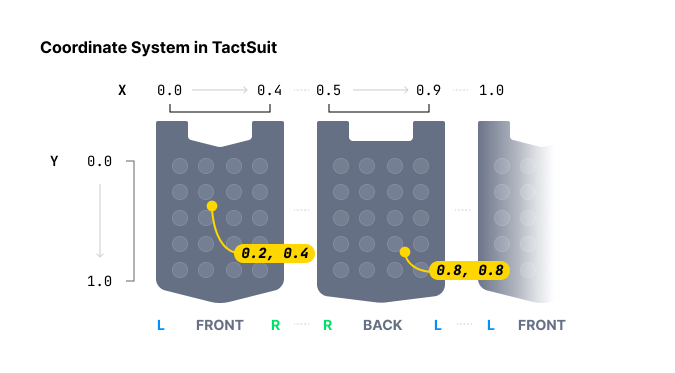
パラメーター
position: 再生するハプティックデバイスのタイプ。詳細については こちら を参考にしてください。値 デバイス モーター数 0TactSuit Pro 32 1TactSleeve(Left) 3 2TactSleeve(Right) 3 3TactVisor 4 4Tactosy for Hands(Left) 3 5Tactosy for Hands(Right) 3 6Tactosy for Feet(Left) 3 7Tactosy for Feet(Right) 3 8TactGlove(Left) 8 9TactGlove(Right) 8 duration_millis: ハプティックの Duration(ミリ秒単位)。100以上を推奨します。x: ハプティックエフェクトの X 座標のリスト。各値の範囲: [0.0-1.0]y: ハプティックエフェクトの Y 座標のリスト。各値の範囲: [0.0-1.0]intensity: 各座標に対する Intensity 値のリスト。長さは座標の数と一致する必要があります。各値の範囲: [0-100]device_index(任意): ハプティックデバイスのデバイスインデックス。
例
import bhaptics_python
import time

async def play_path_example():
    # Path of point #1
    x1 = [0.738, 0.723, 0.709, 0.696, 0.682, 0.667, 0.653]
    y1 = [0.680, 0.715, 0.749, 0.782, 0.816, 0.852, 0.885]
    intensity1 = [20] * len(x1)
    # Path of point #2
    x2 = [0.061, 0.072, 0.102, 0.184, 0.254, 0.310, 0.363]
    y2 = [0.632, 0.587, 0.542, 0.498, 0.411, 0.366, 0.301]
    intensity2 = [60] * len(x2)

    for i in range(len(x1)):
        # Point #1 and #2 will vibrate at the same time.
        await bhaptics_python.play_path(0, 250, [x1[i], x2[i]], [y1[i], y2[i]], [intensity1[i], intensity2[i]])
        time.sleep(0.25)
play_glove
async def bhaptics_python.play_glove(
    position: int,
    motors: list[int],
    playtimes: list[int],
    shapes: list[int],
    repeat_count: int
) -> int
TactGlove 専用。 TactGlove でハプティックを再生します。play_dot を使用する場合とは異なり、ハプティックの Duration や振動 Intensity の変化を細かく調整できます。これにより、ハプティックフィードバックをさらに詳細に表現できます。
各リストは 8 個の要素を持つ必要があり、動作させるには少なくとも 1 個の要素が必要です。
パラメーター
-
position: 再生するハプティックデバイスのタイプ。8または9のみ使用してください。値 デバイス 8TactGlove(Left) 9TactGlove(Right) -
motors: 各モーターの Intensity を表す 8 個 の要素で構成されるリスト。1 個の TactGlove には 8 個のモーターがあるため、リストの長さは 8 である必要があります。リストの各値の有効範囲: [0-100]リストインデックス モーターの位置 0親指の先 1人差し指の先 2中指の先 3薬指の先 4小指の先 5手首 6手のひら(親指側) 7手のひら(小指側) -
playtimes: 作動の時間間隔を表す 8 個の要素で構成されるリスト。Value Playtimes 15ms 210ms 420ms 630ms 840ms -
shapes: 時間に応じたハプティック Intensity 変化の形態を表す 8 個の要素で構成されるリスト。Value 波形 0Duration の間、一定の Intensity 1指定した Intensity から始まり、半分まで減少 2指定した Intensity の半分から始まり、指定した Intensity まで増加 -
repeat_count: 繰り返しの回数。
例
import bhaptics_python
import time

async def play_glove_example():
    motors = [100] * 8
    playtimes = [8] * 8
    shapes = [2] * 8

    # Left hand
    for _ in range(3):
        await bhaptics_python.play_glove(8, motors, playtimes, shapes, 0)
        time.sleep(0.3)

    # Right hand
    for _ in range(3):
        await bhaptics_python.play_glove(9, motors, playtimes, shapes, 0)
        time.sleep(0.3)
再生制御
stop_by_request_id
async def bhaptics_python.stop_by_request_id(request_id: int)
リクエスト ID でハプティック再生を停止します。
パラメーター
request_id: ハプティック再生関数が返したリクエスト ID。
例
import bhaptics_python
import asyncio

async def stop_by_id_example():
    request_id = await bhaptics_python.play_event("shoot")
    await asyncio.sleep(2)
    await bhaptics_python.stop_by_request_id(request_id)
stop_by_event_name
async def bhaptics_python.stop_by_event_name(event_name: str)
特定のイベント名に対するすべてのハプティック再生を停止します。
パラメーター
event_name: 停止したいハプティックイベントの名前。
例
import bhaptics_python
import asyncio

async def stop_by_name_example():
    await bhaptics_python.play_event("shoot")
    await asyncio.sleep(2)
    await bhaptics_python.stop_by_event_name("shoot")
stop_all
async def bhaptics_python.stop_all()
現在再生中のすべてのハプティックを停止します。
ライフサイクル
registry_and_initialize
async def bhaptics_python.registry_and_initialize(
    app_id: str,
    api_key: str,
    default_config: str
) -> bool
ハプティック環境を初期化します。SDK を初期化し、bHaptics Player との接続を確立します。この関数は、ハプティック関連の関数を使用する前に呼び出す必要があります。
パラメーター
app_id: bHaptics Developer Portal で作成したアプリケーション ID。api_key: bHaptics Developer Portal で作成した API キー。default_config: 空の文字列("")を渡します。
戻り値
初期化の成功状態。
例
import bhaptics_python
import asyncio

async def main():
    app_id = "your_app_id"    # App ID created in bHaptics Developer Portal
    api_key = "your_api_key"  # API key created in bHaptics Developer Portal

    # Initialize SDK
    result = await bhaptics_python.registry_and_initialize(app_id, api_key, "")
    print(f"Initialization result: {result}")

asyncio.run(main())
close
async def bhaptics_python.close()
SDK 接続を終了します。
状態確認
is_playing_event_by_request_id
async def bhaptics_python.is_playing_event_by_request_id(request_id: int) -> bool
特定のリクエスト ID の再生状態を確認します。イベントベースの再生と直接再生の両方で動作します。
is_playing_event_by_event_id
async def bhaptics_python.is_playing_event_by_event_id(event_name: str) -> bool
特定のイベントの再生状態を確認します。
is_playing_event
async def bhaptics_python.is_playing_event() -> bool
ハプティック全体の再生状態を確認します。イベントベースの再生と直接再生の両方で動作します。
is_bhaptics_device_connected
async def bhaptics_python.is_bhaptics_device_connected(position: int) -> bool
特定の位置にあるデバイスの接続状態を確認します。
パラメーター
position: 確認するハプティックデバイスのタイプ。値 デバイス 0TactSuit Pro 1TactSleeve(Left) 2TactSleeve(Right) 3TactVisor 4Tactosy for Hands(Left) 5Tactosy for Hands(Right) 6Tactosy for Feet(Left) 7Tactosy for Feet(Right) 8TactGlove(Left) 9TactGlove(Right)
例
import bhaptics_python

# Check connection status for all positions
async def check_all_positions_example():
    for i in range(10):
        is_device_connected = await bhaptics_python.is_bhaptics_device_connected(i)
        print(f"Position {i} device connection: {is_device_connected}")
デバイス制御
デバイス制御関数を使用すると、ping の送信、振動の強さの設定、デバイス位置の入れ替えなど、接続されたハプティックデバイスを直接管理・操作できます。
ping
async def bhaptics_python.ping(device_address: str)
特定のデバイスに ping を送信します。
パラメーター
device_address: ハプティックデバイスの MAC アドレス。get_device_info_jsonを使用してアドレスを取得できます。
例
import bhaptics_python
import json

async def ping_first_device_example():
    device_info_string = await bhaptics_python.get_device_info_json()
    device_info_list = json.loads(device_info_string)

    if len(device_info_list) > 0:
        bhaptics_python.ping(device_info_list[0]['address'])
ping_all
async def bhaptics_python.ping_all()
接続されたすべてのデバイスに ping を送信します。
set_device_vsm
async def bhaptics_python.set_device_vsm(device_address: str, value: int)
デバイスの VSM(Vibration Strength Multiplier)値を設定します。
パラメーター
device_address: ハプティックデバイスの MAC アドレス。get_device_info_jsonを使用してアドレスを取得できます。value: VSM(Vibration Strength Multiplier)値。デフォルトの VSM は100(x1.00 のフィードバック Intensity)です。有効範囲: [0-200]
例
import bhaptics_python
import json

async def set_first_device_esm_example():
    device_info_string = await bhaptics_python.get_device_info_json()
    device_info_list = json.loads(device_info_string)

    if len(device_info_list) > 0:
        bhaptics_python.set_device_vsm(device_info_list[0]['address'], 100)
swap_position
async def bhaptics_python.swap_position(device_address: str)
デバイスの位置を左と右の間で入れ替えます。
位置を入れ替えられるデバイスは次のとおりです:
- Tactosy for Feet
- Tactosy for Hands
パラメーター
device_address: ハプティックデバイスの MAC アドレス。get_device_info_jsonを使用してアドレスを取得できます。
例
import bhaptics_python
import json

async def swap_first_device_example():
    device_info_string = await bhaptics_python.get_device_info_json()
    device_info_list = json.loads(device_info_string)

    if len(device_info_list) > 0:
        # Swap the position of the first device
        await bhaptics_python.swap_position(device_info_list[0]['address'])
情報の取得
get_device_info_json
await bhaptics_python.get_device_info_json() -> str
接続されたデバイス情報を JSON 形式で返します。
戻り値
デバイス情報を JSON 形式で格納した文字列。
次は、2 個のハプティックデバイスが接続された環境で返される文字列の例です。
[
  {
    "position": 0,
    "deviceName": "TactSuitPro",
    "address": "UNIQUE_ADDRESS_GOES_HERE",
    "connected": true,
    "paired": true,
    "battery": 72,
    "audioJackIn": false,
    "vsm": 20
  },
  {
    "position": 3,
    "deviceName": "TactVisor",
    "address": "UNIQUE_ADDRESS_GOES_HERE",
    "connected": true,
    "paired": true,
    "battery": 85,
    "audioJackIn": false,
    "vsm": 20
  }
]
例
import bhaptics_python
import json

async def device_count_example():
    device_info_string = await bhaptics_python.get_device_info_json()
    device_info_list = json.loads(device_info_string)

    print(f"Connected device count: {len(device_info_list)}")