Class UBhapticsSDK2
UBlueprintFunctionLibrary を継承します
UBhapticsSDK2 クラスは bHaptics のハプティックデバイスを使用するための関数を含んでいます。
リファレンス
| Module | BhapticsPlugin |
| Header | Engine\Plugins\Marketplace\BhapticsPlugin\Source\BhapticsPlugin\Public\BhapticsSDK2.h |
| Include | #include "BhapticsSDK2.h" |
静的関数 — イベント駆動ハプティックの再生
Designer/Portal で作成した特定のハプティックイベントにバインドされたハプティックパターンを再生します。これらの関数の使用を強く推奨します。
PlayHaptic
static int PlayHaptic(FString eventId);
ハプティックイベントを再生します。ハプティックイベントを呼び出す最も基本的な方法です。すべてのハプティックイベント呼び出し関数の中でオーバーヘッドが最も低いです。
Parameters
FString eventId: 再生したいハプティックイベントの名前です。
Returns
Request ID です。Request ID を使用してハプティックを停止できます。返却に失敗すると -1 を返します。
ただし Hub に接続されている場合、Hub は戻り値を提供しないため、失敗した呼び出しが -1 を返しません。
Example
#include "BhapticsSDK2.h"

void AExample::Shoot()
{
    // Assuming the event name is "shootpistol"
    UBhapticsSDK2::PlayHaptic("shootpistol");
}
PlayHapticWithOption
static int PlayHapticWithOption(FString eventId, float intensity = 1.0f, float duration = 1.0f, float angleX = 0.0f, float offsetY = 0.0f, int requestId = -1);
ハプティックの強さ、Duration、方向を調整しながらハプティックイベントを再生します。
Parameters
FString eventId: 再生したいハプティックイベントの名前です。float intensity: ハプティック Intensity にこの値が掛けられます。float duration: ハプティック Duration にこの値が掛けられます。float angleX: グローバルなVector3.upを中心にハプティックを反時計回りに回転します。有効範囲: [0.0f-360.0f]float offsetY: ハプティックを上または下に移動します。有効範囲: [-0.5f-0.5f]int requestId: ランダムな ID の代わりに使用する Request ID を指定します。有効な値は0以上です。省略した場合、または負の値を指定した場合は、ランダムな ID が割り当てられます。Request ID の再利用
通常、別のハプティックの再生中にハプティックを再生すると、新しい再生は現在の再生に重なって実行されます。ただし、現在のハプティックと同じ
eventIdとrequestIdで再生すると、現在の再生が停止し、新しい再生が開始されます。これにより、短い間隔で繰り返し再生したときに各ハプティックがより明確に感じられ、ハプティックが積み重なるのを防げます。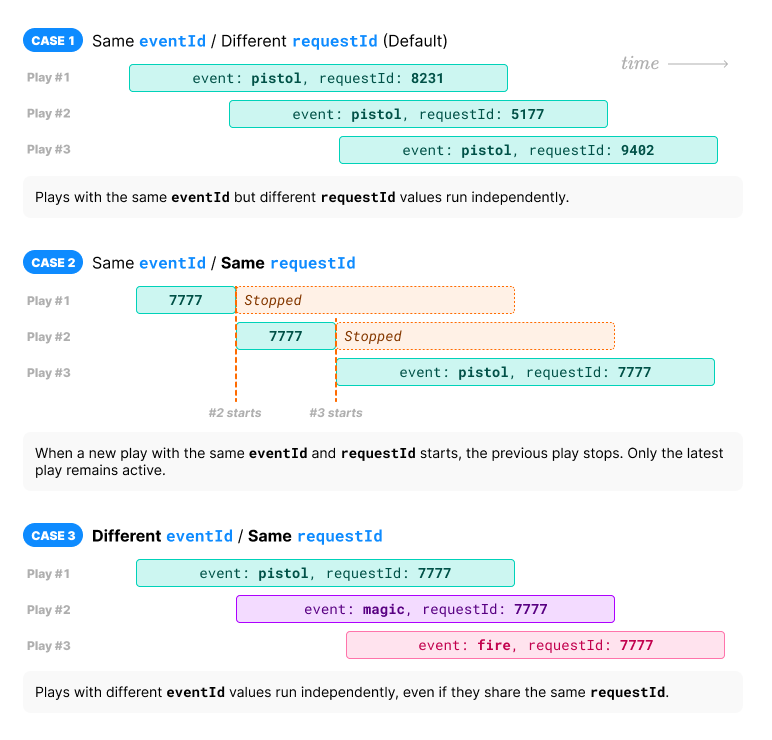
Returns
Request ID です。Request ID を使用してハプティックを停止できます。返却に失敗すると -1 を返します。
ただし Hub に接続されている場合、Hub は戻り値を提供しないため、失敗した呼び出しが -1 を返しません。
Example
#include "BhapticsSDK2.h"

void AExample::Shoot()
{
    UBhapticsSDK2::PlayHapticWithOption(
        "shootpistol", //  Haptic name
        1.0f, // Haptic intensity
        1.0f, // Haptic duration
        0.0f, // Rotate haptic around global Vector3.up (0f - 360f)
        0.0f  // Move haptic up or down (-0.5f - 0.5f)
    );
}
PlayWithStartTime
static int PlayWithStartTime(FString eventId, int startMillis = 0, float intensity = 1.0f, float duration = 1.0f, float angleX = 0.0f, float offsetY = 0.0f, int requestId = -1);
ハプティックの強さ、Duration、方向を調整しながらハプティックイベントを再生します。
Parameters
FString eventId: 再生したいハプティックイベントの名前です。int startMillis: イベント再生を開始する位置(ms)です。先頭のstartMillisms はスキップされます(再生前の遅延ではなく、開始 Offset です)。デフォルトは0です。Windows/macOS/Android only.float intensity: ハプティック Intensity にこの値が掛けられます。float duration: ハプティック Duration にこの値が掛けられます。float angleX: グローバルなVector3.upを中心にハプティックを反時計回りに回転します。有効範囲: [0.0f-360.0f]float offsetY: ハプティックを上または下に移動します。有効範囲: [-0.5f-0.5f]int requestId: ランダムな ID の代わりに使用する Request ID を指定します。有効な値は0以上です。省略した場合、または負の値を指定した場合は、ランダムな ID が割り当てられます。Request ID の再利用
通常、別のハプティックの再生中にハプティックを再生すると、新しい再生は現在の再生に重なって実行されます。ただし、現在のハプティックと同じ
eventIdとrequestIdで再生すると、現在の再生が停止し、新しい再生が開始されます。これにより、短い間隔で繰り返し再生したときに各ハプティックがより明確に感じられ、ハプティックが積み重なるのを防げます。
Returns
Request ID です。Request ID を使用してハプティックを停止できます。返却に失敗すると -1 を返します。
ただし Hub に接続されている場合、Hub は戻り値を提供しないため、失敗した呼び出しが -1 を返しません。
Example
#include "BhapticsSDK2.h"

void AExample::Shoot()
{
    UBhapticsSDK2::PlayWithStartTime(
        "shootpistol", //  Haptic name
        0,    // Playback start position (millisecond)
        1.0f, // Haptic intensity
        1.0f, // Haptic duration
        0.0f, // Rotate haptic around global Vector3.up (0f - 360f)
        0.0f  // Move haptic up or down (-0.5f - 0.5f)
    );
}
PlayLoop
static int PlayLoop(FString eventId, float intensity = 1.0f, float duration = 1.0f, float angleX = 0.0f, float offsetY = 0.0f, int interval = 200, int maxCount = 999999);
ハプティックを繰り返し再生します。さらに、PlayHapticWithOption 関数のように、ハプティックの強さ、Duration、方向を調整できます。
Parameters
FString eventId: 再生したいハプティックイベントの名前です。float intensity: ハプティック Intensity にこの値が掛けられます。float duration: ハプティック Duration にこの値が掛けられます。float angleX: グローバルなVector3.upを中心にハプティックを反時計回りに回転します。有効範囲: [0.0f-360.0f]float offsetY: ハプティックを上または下に移動します。有効範囲: [-0.5f-0.5f]int interval: ループ間の時間間隔で、ミリ秒単位です。int maxCount: ループ回数です。
Returns
Request ID です。Request ID を使用してハプティックを停止できます。返却に失敗すると -1 を返します。
ただし Hub に接続されている場合、Hub は戻り値を提供しないため、失敗した呼び出しが -1 を返しません。
Example
#include "BhapticsSDK2.h"

void AExample::Shoot()
{
    UBhapticsSDK2::PlayLoop(
        "shootpistol",  // Haptic name
        1.0f,  // Haptic intensity
        1.0f,  // Haptic duration
        0.0f,  // Rotate haptic around global Vector3.up (0f - 360f)
        0.0f,  // Move haptic up or down (-0.5f - 0.5f)
        200,   // Loop interval time (millisecond)
        999999 // Loop count
    );
}
静的関数 — ハプティックの直接再生
新しいイベントを作成せずにハプティックを再生したい場合は、これらの関数を使用してください。
PlayDot
static int PlayDot(int position, TArray<int> motorValues, float seconds = 0.5f);
特定のハプティックアクチュエータでハプティックフィードバックを再生します。イベントを作成せずにこの関数を使用できます。
Parameters
int position: ハプティックデバイスの種類です。詳細はこちらを参照してください。値 デバイス 同じ値... モーター数 0TactSuit Pro EBhapticsDevicePosition::Vest32 1TactSleeve(Left) EBhapticsDevicePosition::ForearmL3 2TactSleeve(Right) EBhapticsDevicePosition::ForearmR3 3TactVisor EBhapticsDevicePosition::Head4 4Tactosy for Hands(Left) EBhapticsDevicePosition::HandL3 5Tactosy for Hands(Right) EBhapticsDevicePosition::HandR3 6Tactosy for Feet(Left) EBhapticsDevicePosition::FootL3 7Tactosy for Feet(Right) EBhapticsDevicePosition::FootR3 8TactGlove(Left) EBhapticsDevicePosition::GloveL8 9TactGlove(Right) EBhapticsDevicePosition::GloveR8 TArray<int> motorValues: デバイスのモーター数に合わせて配列の長さを指定します。配列の値はモーターの Intensity を意味します。配列内の各値の有効範囲: [0-100]float seconds: ハプティックの Duration で、秒単位です。0.1f以上を推奨します。
Returns
Request ID です。Request ID を使用してハプティックを停止できます。返却に失敗すると -1 を返します。
ただし Hub に接続されている場合、Hub は戻り値を提供しないため、失敗した呼び出しが -1 を返しません。
Example
#include "BhapticsSDK2.h"

void AExample::Shoot()
{
 // TactSuit Pro has 32 motors, so length of array should be 32 too.
    TArray<int> MotorValueArray = TArray<int>{
        50, 40, 30, 20, 10, 50, 40, 30,
        50, 40, 30, 20, 10, 50, 40, 30,
        50, 40, 30, 20, 10, 50, 40, 30,
        50, 40, 30, 20, 10, 50, 40, 30};

    UBhapticsSDK2::PlayDot(
        (int)EBhapticsDevicePosition::Vest, // Device type
        MotorValueArray,                    // Haptic intensities
        0.5f                                // Haptic duration (second)
    );
}
PlayPath
static int PlayPath(int position, TArray<float> x, TArray<float> y, TArray<int> motorValues, float seconds = 0.5);
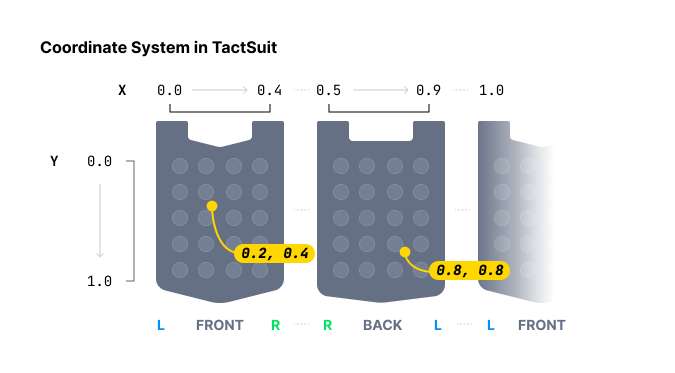
特定の座標の周囲でハプティックを再生します。各ハプティックアクチュエータごとにハプティック Intensity を個別に指定する PlayDot 関数と異なり、この方法は特定の座標に対するハプティック Intensity を指定します。
ハプティックの位置を指定する際、PlayDot は離散的な制御を提供するのに対し、PlayPath はより連続的です。PlayDot は個々のアクチュエータに Intensity を割り当てますが、PlayPath は特定の座標(X 軸と Y 軸ともに 0 から 1 の間)に Intensity を割り当て、それに応じて近くのアクチュエータが振動します。
配列に複数の座標を複数の Intensity とともに入れることができます。配列内のこれらの座標の周囲のすべてのアクチュエータは、順次ではなく**同時に(同じ時刻に)**作動する点に注意してください。さらに、すべての配列のサイズは同じでなければなりません。
値を段階的に変更しながらこの関数を継続的に呼び出すことで、ハプティックポイントが移動する効果を得られます。
[TactGlove DK3] PlayPath は DK3 グローブの手首 voice-coil motor(VCM)を駆動しません。
Parameters
int position: ハプティックデバイスの種類です。値 デバイス 同じ値... 0TactSuit Pro EBhapticsDevicePosition::Vest1TactSleeve(Left) EBhapticsDevicePosition::ForearmL2TactSleeve(Right) EBhapticsDevicePosition::ForearmR3TactVisor EBhapticsDevicePosition::Head4Tactosy for Hands(Left) EBhapticsDevicePosition::HandL5Tactosy for Hands(Right) EBhapticsDevicePosition::HandR6Tactosy for Feet(Left) EBhapticsDevicePosition::FootL7Tactosy for Feet(Right) EBhapticsDevicePosition::FootR8TactGlove(Left) EBhapticsDevicePosition::GloveL9TactGlove(Right) EBhapticsDevicePosition::GloveRTArray<float> x: X 座標を指定します。配列内の各値の有効範囲: [0.0f-1.0f]TArray<float> y: Y 座標を指定します。配列内の各値の有効範囲: [0.0f-1.0f]TArray<int> motorValues: 座標の数に合わせて配列の長さを指定します。配列の値は座標の Intensity を意味します。配列内の各値の有効範囲: [0-100]float seconds: ハプティックの Duration で、秒単位です。0.1f以上を推奨します。
Returns
Request ID です。Request ID を使用してハプティックを停止できます。返却に失敗すると -1 を返します。
ただし Hub に接続されている場合、Hub は戻り値を提供しないため、失敗した呼び出しが -1 を返しません。
Example
#include "BhapticsSDK2.h"

/* Assumption:
 - For TactSuit Pro
 - Coordinate with Intensity
    - (X: 0.1, Y: 0.2) Intensity 40
    - (X: 0.3, Y: 0.4) Intensity 80
    - (X: 0.5, Y: 0.6) Intensity 10
  - Duration 0.5 second
*/
void AExample::Shoot()
{
    UBhapticsSDK2::PlayPath(
        (int)EBhapticsDevicePosition::Vest, // Device Type
        TArray<float>{0.1f, 0.3f, 0.5f},    // X Coordinates
        TArray<float>{0.2f, 0.4f, 0.6f},    // Y Coordinates
        TArray<int>{40, 80, 10},            // Intensities
        0.5f                                // Duration
    );
}
PlayWaveform
static int PlayWaveform(int position, TArray<int> motorIntensities, TArray<EBhapticsGlovePlayTime> playTimeValues, TArray<EBhapticsGloveShapeValue> shapeValues, int frequency = 80, int repeatCount = 0);
TactGlove 専用。 TactGlove でハプティックを再生します。PlayDot を使用する場合と異なり、ハプティック Duration と振動 Intensity の変化を細かく調整できます。これにより、ハプティックフィードバックをより繊細に表現できます。
各配列(motorIntensities、playTimeValues、shapeValues)は、TactGlove DK2 の場合は 6 個、TactGlove DK3 の場合は 8 個の要素を持つ必要があり、3 つの配列の長さはすべて同じでなければなりません。それ以外の長さの場合は -1 を返します。
Parameters
-
int position: ハプティックデバイスの種類です。値 デバイス 同じ値… 8TactGlove(Left) EBhapticsDevicePosition::GloveL9TactGlove(Right) EBhapticsDevicePosition::GloveR -
TArray<int> motorIntensities: 各モーターの Intensity を表す配列です。その長さは TactGlove のモーター数と一致する必要があります。すなわち 6 個(TactGlove DK2)または 8 個(TactGlove DK3)です。配列インデックス6と7(下表参照)の手のひらモーターは DK3 にのみ存在します。配列内の各値の有効範囲: [0-100]配列インデックス モーターの位置… 0親指の先 1人差し指の先 2中指の先 3薬指の先 4小指の先 5手首 6手のひら(親指側) 7手のひら(小指側) -
TArray<EBhapticsGlovePlayTime> playTimeValues:motorIntensitiesと同じ長さ(DK2 は 6 個、DK3 は 8 個)の配列で、各要素は作動の時間間隔を表し、時間はEBhapticsGlovePlayTime列挙型で定義します。値 Duration 同じ値… EBhapticsGlovePlayTime::Noneなし 0EBhapticsGlovePlayTime::FiveMS5ms 1EBhapticsGlovePlayTime::TenMS10ms 2EBhapticsGlovePlayTime::TwentyMS20ms 4EBhapticsGlovePlayTime::ThirtyMS30ms 6EBhapticsGlovePlayTime::FortyMS40ms 8 -
TArray<EBhapticsGloveShapeValue> shapeValues:motorIntensitiesと同じ長さ(DK2 は 6 個、DK3 は 8 個)の配列で、各要素は時間に応じたハプティック Intensity の変化の形を表し、EBhapticsGloveShapeValue列挙型で指定します。値 ウェイブフォーム 同じ値… EBhapticsGloveShapeValue::ConstantDuration の間、一定の Intensity 0EBhapticsGloveShapeValue::Decreasing指定した Intensity で始まり、半分まで減少 1EBhapticsGloveShapeValue::Increasing指定した Intensity の半分で始まり、指定した Intensity まで増加します。 2[TactGlove DK3] DK3 グローブでは、手首アクチュエータ(配列インデックス
5)が voice-coil motor(VCM)であるため、shapeValuesを反映しません。他の 7 個のモーターは DK2 グローブと同じようにウェイブフォームの形が適用されます。 -
int frequency: [TactGlove DK3 専用] DK3 グローブ自体のアクチュエータの振動周波数(Hz)です。デフォルトは80です。DK3 グローブ自体にのみ影響し、接続された他のデバイスの動作周波数は変更しません。DK2 グローブや汎用(non-Windows/macOS)パスには影響しません。Windows/macOS only. -
int repeatCount: ウェイブフォームを繰り返す回数で、1から数えます。0は一度だけ再生します。Windows/macOS only.
Returns
Request ID です。Request ID を使用してハプティックを停止できます。返却に失敗すると -1 を返します。
ただし Hub に接続されている場合、Hub は戻り値を提供しないため、失敗した呼び出しが -1 を返しません。
Example
#include "BhapticsSDK2.h"

void AExample::Shoot()
{
    TArray<int> GloveMotorValue = TArray<int>{50, 50, 50, 50, 50, 50, 50, 50};

    TArray<EBhapticsGlovePlayTime> GlovePlayTime = {
        EBhapticsGlovePlayTime::FiveMS, EBhapticsGlovePlayTime::TenMS,
        EBhapticsGlovePlayTime::TwentyMS, EBhapticsGlovePlayTime::ThirtyMS,
        EBhapticsGlovePlayTime::FortyMS, EBhapticsGlovePlayTime::None,
        EBhapticsGlovePlayTime::None, EBhapticsGlovePlayTime::None};

    TArray<EBhapticsGloveShapeValue> GloveShapeValue = {
        EBhapticsGloveShapeValue::Constant, EBhapticsGloveShapeValue::Decreasing,
        EBhapticsGloveShapeValue::Increasing, EBhapticsGloveShapeValue::Constant,
        EBhapticsGloveShapeValue::Decreasing, EBhapticsGloveShapeValue::Increasing,
        EBhapticsGloveShapeValue::Constant, EBhapticsGloveShapeValue::Constant};

    UBhapticsSDK2::PlayWaveform(
        (int)EBhapticsDevicePosition::GloveL, // Device Type
        GloveMotorValue,                      // Intensities
        GlovePlayTime,                        // Intervals
        GloveShapeValue                       // Intensity changing forms
    );
}
静的関数 — その他
StopHapticByEventId
static bool StopHapticByEventId(FString eventId);
Event ID でハプティックイベントを停止します。停止の成否を返します。
#include "BhapticsSDK2.h"

void AExample::Example()
{
    UBhapticsSDK2::StopHapticByEventId("eventID");
}
StopHapticByRequestId
static bool StopHapticByRequestId(int requestId);
ハプティックを実行する関数の戻り値である Request ID を使用して、ハプティックイベントを停止します。停止の成否を返します。
#include "BhapticsSDK2.h"

void AExample::Example()
{
    int RequestID = UBhapticsSDK2::PlayHaptic("eventID");
    UBhapticsSDK2::StopHapticByRequestId(RequestID);
}
StopHaptic
static bool StopHaptic();
現在再生中のすべてのハプティックを停止します。停止の成否を返します。
#include "BhapticsSDK2.h"

void AExample::Example()
{
    UBhapticsSDK2::PlayHaptic("bangbang");
    UBhapticsSDK2::PlayHaptic("eventID");
    UBhapticsSDK2::PlayHaptic("explosion");

    UBhapticsSDK2::StopHaptic();
}
PauseHapticByEventId
static void PauseHapticByEventId(FString eventId);
Event ID でハプティックイベントを一時停止します。再生位置が保持されるため、後で ResumeHapticByEventId で続けて再生できます。
#include "BhapticsSDK2.h"

void AExample::Example()
{
    UBhapticsSDK2::PauseHapticByEventId("eventID");
}
ResumeHapticByEventId
static void ResumeHapticByEventId(FString eventId);
PauseHapticByEventId で一時停止したハプティックイベントを、一時停止した位置から続けて再生します。
#include "BhapticsSDK2.h"

void AExample::Example()
{
    UBhapticsSDK2::ResumeHapticByEventId("eventID");
}
IsPlaying
static bool IsPlaying();
ハプティックが再生中かを確認します。
#include "BhapticsSDK2.h"

void AExample::Example()
{
    if (UBhapticsSDK2::IsPlaying())
    {
        StopHaptic();
    }
}
IsPlayingByEventId
static bool IsPlayingByEventId(FString eventId);
この Event ID に該当するハプティックイベントが再生中かを確認します。
#include "BhapticsSDK2.h"

void AExample::Example()
{
    UBhapticsSDK2::PlayHaptic("eventID");

    if (UBhapticsSDK2::IsPlayingByEventId("eventID"))
    {
        UBhapticsSDK2::StopHapticByEventId("eventID");
    }
}
IsPlayingByRequestId
static bool IsPlayingByRequestId(int requestId);
この Request ID に該当するハプティックイベントが再生中かを確認します。
#include "BhapticsSDK2.h"

void AExample::Example()
{
    int RequestID = UBhapticsSDK2::PlayHaptic("eventID");
    if (UBhapticsSDK2::IsPlayingByRequestId(RequestID))
    {
        UBhapticsSDK2::StopHapticByRequestId(RequestID);
    }
}
Initialize
static void Initialize();
ハプティック環境を初期化します。ハプティック関連の関数を使用する前にこの関数を呼び出す必要があります。
Ping
static void Ping(FBhapticsDevice device);
特定のデバイスに簡単なハプティックフィードバックを送信します。
PingAll
static void PingAll();
接続されたすべてのデバイスに簡単なハプティックフィードバックを送信します。
Destroy
static void Destroy();
ハプティック環境を解放します。この関数はゲーム終了時に呼び出す必要があり、必ず一度だけ呼び出してください。
GetBhapticsDevices
static TArray<FBhapticsDevice> GetBhapticsDevices();
接続されたハプティックデバイス情報の配列を取得します。
IsBhapticsAvailable
static bool IsBhapticsAvailable();
ハプティック環境が初期化され、ハプティック関連の関数を使用する準備ができているかを確認します。
ProjectToVest
static FBhapticsRotationOption ProjectToVest(
    FVector ContactLocation,
    UPrimitiveComponent* PlayerComponent,
    float HalfHeight = 0
);
プレイヤーから見た、指定された衝突接触点の Offset 値(角度と高さ)を計算するヘルパー関数です。これらの Offset 値は、ハプティックの位置を調整できる PlayHapticWithOption と PlayLoop で使用できます。
この関数は、正面方向がベストの前面と一致すると仮定し、プレイヤーの位置を原点と見なします。
詳細は以下の例を確認してください。
Parameters
FVector ContactLocation: グローバル座標系の接触点です。UPrimitiveComponent* PlayerComponent: プレイヤーにアタッチされたプリミティブコンポーネントへの参照です。float HalfHeight: プレイヤーの実際の身長の半分の値で、センチメートル単位です。
Example
VR ゲームで銃に撃たれたときのハプティックを実装すると仮定してみましょう。このイベントに対応するハプティックパターンは、TactSuit 正面中央の短く強いハプティックフィードバックになるでしょう。現実感を高めるには、プレイヤーが撃たれた位置に応じてハプティックフィードバックの高さと角度を変えるのが理想的です。
PlayHapticWithOption と PlayLoop 関数を使用すると、ハプティックパターンの高さと角度を調整できます。これらの関数は、ハプティックの調整のために 角度(OffsetAngleX)と高さ(OffsetY) 値を受け取ります。
ProjectToVest 関数は、プレイヤーが撃たれた位置、プレイヤーのトランスフォーム情報、ユーザーの身長に基づいて角度と高さの値を計算します。これらの値は FBhapticsRotationOption 構造体に格納されて返されます。
-08a69024da438d538cc3301a1ecab27f.png)
#include "BhapticsSDK2.h"

void AExample::HitByBullet()
{
    APawn *PlayerPawn = UGameplayStatics::GetPlayerPawn(GetWorld(), 0);
    UPrimitiveComponent *PlayerComponent = Cast<UPrimitiveComponent>(PlayerPawn->GetRootComponent());

    FVector ContactLocation = USomewhere::GetContactLocationSomehow();
    float HalfHeight = YourActualHeight / 2;

    FBhapticsRotationOption result = UBhapticsSDK2::ProjectToVest(ContactLocation, PlayerComponent, HalfHeight);

    UBhapticsSDK2::PlayHapticWithOption("hit_by_bullet", 1.0f, 1.0f, result.OffsetAngleX, result.OffsetY);
}
ProjectToVestLocation
static FBhapticsRotationOption ProjectToVestLocation(FVector ContactLocation, FVector PlayerLocation, FRotator PlayerRotation);
接触位置とプレイヤーのトランスフォーム情報から Offset 値を計算するヘルパー関数です。ProjectToVest に似ていますが、角度 Offset(OffsetAngleX)のみを計算します。高さ(OffsetY)は常に 0 です。
Parameters
FVector ContactLocation: グローバル座標系の接触点です。FVector PlayerLocation: プレイヤーの位置です。FRotator PlayerRotation: プレイヤーの回転です。
CustomProjectToVest
static FBhapticsRotationOption CustomProjectToVest(FVector ContactLocation, UPrimitiveComponent* PlayerComponent, float HalfHeight = 0, FVector UpVector = FVector::ZeroVector, FVector ForwardVector = FVector::ZeroVector);
衝突から Offset 値を計算するヘルパー関数です。ProjectToVest と同じ機能を実行しますが、Forward および Up ベクトルを変更できます。
FVector ContactLocation: グローバル座標系の接触点です。UPrimitiveComponent* PlayerComponent: プレイヤーにアタッチされたプリミティブコンポーネントへの参照です。float HalfHeight: プレイヤーの実際の身長の半分の値で、センチメートル単位です。FVector UpVector: Offset 計算の基準となる上方向ベクトルです。FVector ForwardVector: Offset 計算の基準となる正面方向ベクトルです。