JavaScript 가이드
JavaScript SDK를 사용하면 JS/TS 프로젝트에 햅틱을 구현할 수 있습니다. TypeScript를 위한 타입 시스템과 ESM도 지원합니다.
- 패키지 설치
- 햅틱 환경 설정
요구 사항
- Node.js (최신 LTS 버전 권장)
- OS: Windows 10/11 (x64), macOS (Apple Silicon)
- bHaptics Player 설치 및 실행
- 프로젝트에 해당하는 배포된 햅틱 애플리케이션
- 햅틱 앱의 앱 ID와 API 키
tact-js는 브라우저에서만 실행됩니다. Vite와 같은 도구로 번들링된 웹 앱 내에서 사용하세요.
About haptic application
You can create and manage haptic apps in Developer Portal, a web-based tool.
If you're unfamiliar with haptic apps or haven't created one yet, please follow the Portal guide before proceeding.
Before linking a haptic app to your game project, make sure the haptic app meets the following requirements:
- At least one haptic event must be created.
- API Key must be generated.
- There is no API Key by default. To generate one, go to the "API Key" tab and click "New" button.
- Haptic app must be deployed
- If you see "Deploy Now" button in the upper right corner, click it to deploy your haptic app. Otherwise, if you can see "Up to date", it means that the latest haptic app has already been deployed.
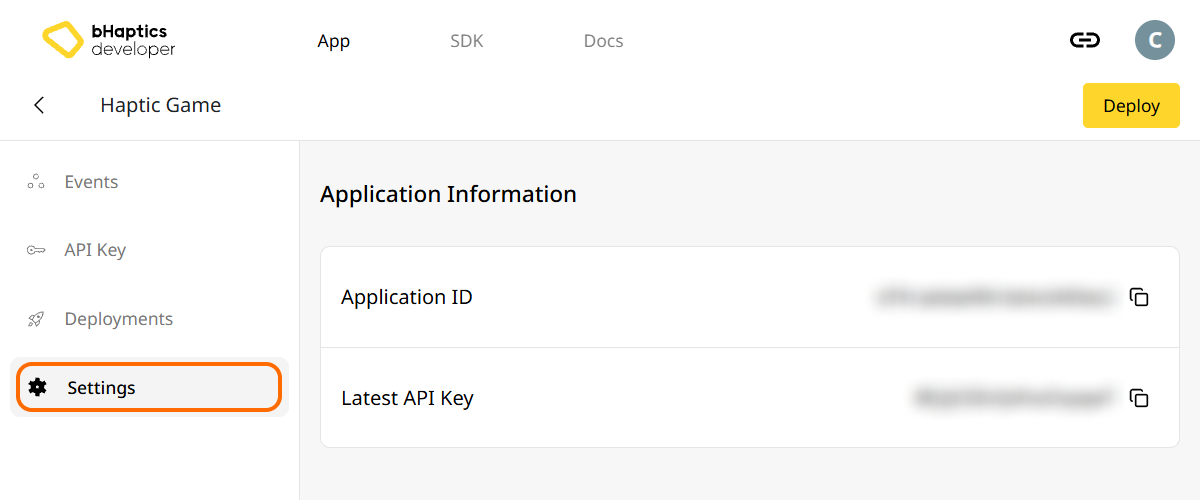
Also, link process requires App ID and API Key. Go to the "Settings" tab, and check the App ID and API Key.
설치
- npm
- yarn
- pnpm
npm install tact-js
yarn add tact-js
pnpm add tact-js
패키지 가져오기
import Tact from "tact-js";
최적화 대상에서 제외하기
Vite를 사용하는 경우, Vite 설정 파일에 다음을 추가하세요:
export default defineConfig({
  // ...
  optimizeDeps: {
    exclude: ['tact-js'],
  },
  // ...
});
햅틱 환경 설정
햅틱 관련 함수를 사용하기 전에 햅틱 앱을 프로젝트에 연결하고 햅틱 환경을 초기화해야 합니다.
이를 위해서는 햅틱 앱의 앱 ID와 API 키가 필요합니다. bHaptics Developer Portal에서 확인할 수 있습니다.
초기화
"your_app_id"와"your_api_key"를 본인의 앱 ID와 API 키로 교체하세요.- JavaScript 프로젝트를 실행하기 전에 bHaptics Player 애플리케이션이 컴퓨터에서 실행 중인지 확인하세요.
import Tact from "tact-js";

const initTact = async () => {
  const result = await Tact.init({
    appId: "your_app_id",
    apiKey: "your_api_key",
  });

  console.log(result ? "Connection Success!" : "Connection Failed...");
}
더 읽어보기
이제 bHaptics 햅틱 기능을 사용할 준비가 되었습니다! 프로젝트에서 햅틱을 재생하려면 JavaScript 레퍼런스를 방문하거나, 아래의 전체 예제 코드를 참고하세요.
이 라이브러리를 사용하는 데 문제가 있다면 문제 해결을 확인하세요.
전체 예제 코드
tact-js는 브라우저에서 실행되므로, 아래 예제는 Vite를 사용합니다. 페이지를 열기 전에 bHaptics Player가 실행 중인지 확인하세요.
<!doctype html>
<html lang="en">
  <head>
    <meta charset="UTF-8" />
    <title>bHaptics tact-js example</title>
  </head>
  <body>
    <button id="play">Play haptic</button>
    <pre id="log"></pre>
    <script type="module" src="/src/main.js"></script>
  </body>
</html>
import Tact, { PositionType } from "tact-js";

// Replace with your App ID and API Key from the bHaptics Developer Portal.
const APP_ID = "your_app_id";
const API_KEY = "your_api_key";

const logEl = document.getElementById("log");
const log = (msg) => {
  console.log(msg);
  logEl.textContent += msg + "\n";
};

const sleep = (ms) => new Promise((resolve) => setTimeout(resolve, ms));

let ready = false;

// 1. Initialize on load. bHaptics Player must already be running.
const initialize = async () => {
  log("Initializing bHaptics SDK...");
  ready = await Tact.init({ appId: APP_ID, apiKey: API_KEY });
  log(ready ? "Connected to bHaptics Player." : "Failed to connect. Is bHaptics Player running?");

  if (ready) {
    const devices = await Tact.getConnectedDevices();
    log(`Connected devices: ${JSON.stringify(devices)}`);
  }
};

// 2. Run a short haptic sequence when the button is clicked.
const runDemo = async () => {
  if (!ready) {
    log("SDK is not ready yet.");
    return;
  }

  // Play dot pattern — first 16 of the TactSuit Pro's 32 motors.
  log("- Playing dot pattern");
  const motorValues = [...Array(16).fill(50), ...Array(16).fill(0)];
  await Tact.playDot({ position: PositionType.Vest, motorValues, duration: 2000 });
  await sleep(2500);

  // Play path pattern.
  log("- Playing path pattern");
  await Tact.playPath({
    position: PositionType.Vest,
    x: [0.2, 0.4, 0.6, 0.8],
    y: [0.2, 0.8, 0.2, 0.8],
    intensity: [80, 60, 80, 60],
    duration: 3000,
  });
  await sleep(3500);

  // Play glove waveform on both hands (if connected).
  log("- Testing glove haptics");
  const motors = new Int32Array([100, 0, 0, 0, 0, 100, 0, 100]);
  const playtimes = new Int32Array([8, 0, 0, 0, 0, 1, 0, 4]);
  const shapes = new Int32Array([2, 0, 0, 0, 0, 0, 0, 0]);
  await Tact.playGlove({ position: PositionType.GloveL, motors, playtimes, shapes, repeatCount: 1 });
  await sleep(1000);
  await Tact.playGlove({ position: PositionType.GloveR, motors, playtimes, shapes, repeatCount: 1 });
  await sleep(1000);

  await Tact.stopAll();
  log("Demo completed");
};

document.getElementById("play").addEventListener("click", runDemo);

initialize();
더 많은 예제를 살펴보려면 공식 GitHub 저장소의 README를 확인하세요.