References
The BhapticsKit class provides functions for controlling bHaptics haptic devices from Swift. It enables you to connect haptic devices, play haptic patterns, control device motors directly, and manage haptic playback.
import BhapticsPlugin

let kit = BhapticsKit()
Functions that play haptics return a request ID. You can use it to check or stop the playback.
Lifecycle
init
init()
init(delegate: BhapticsKitDelegate?)
Create the SDK instance. Create one instance and keep it for the lifetime of your app.
On iOS and visionOS, creating the instance starts Bluetooth, and the system asks the user for Bluetooth permission.
Parameters
delegate(optional): Receives Bluetooth and device state changes. See BhapticsKitDelegate.
initialize
func initialize(appId: String, apiKey: String, defaultSetting: String) async -> Bool
func initialize(appId: String, apiKey: String, defaultSetting: String)
Initialize the haptic environment. This function should be called before using the event-related functions.
- On iOS and visionOS, it downloads the haptic events of your haptic app from the server.
- On macOS, it connects to bHaptics Player. If bHaptics Player is installed but not running, it launches bHaptics Player.
The non-async version runs the same initialization in the background, and does not return the result.
Parameters
appId: Application ID created in bHaptics Developer Portal.apiKey: API key created in bHaptics Developer Portal.defaultSetting: Pass an empty string("").
Returns
Initialization success status.
Example
let result = await kit.initialize(appId: "your_app_id", apiKey: "your_api_key", defaultSetting: "")
print("Initialization result: \(result)")
delegate
var delegate: BhapticsKitDelegate?
Receives Bluetooth and device state changes. See BhapticsKitDelegate.
Play Event-driven Haptic
Play haptic patterns bound to specific events (designed in the bHaptics Designer/Portal). These are the recommended functions for most applications.
play
func play(eventId: String) -> Int
Play the predefined haptic event.
Parameters
eventId: Name of the haptic event.
Returns
Request ID. You can use this to stop playback.
Example
let requestId = kit.play(eventId: "heartbeat")
print("Playback request ID: \(requestId)")
playParam
func playParam(
    eventId: String,
    requestId: Int? = nil,
    intensity: Float,
    duration: Float,
    angleX: Float,
    offsetY: Float
) -> Int
Play the haptic event, with adjusting the strength, duration, and direction of the haptic.
Parameters
eventId: Name of the haptic event.requestId(optional): Request ID to use for this playback. If omitted, a random ID is assigned.intensity: Multiplier for haptic intensity. Valid range is: [0.0-2.0] (Default:1.0)duration: Multiplier for duration. (Default:1.0)angleX: Rotate haptic counterclockwise. Valid range is: [0.0-360.0] (Default:0.0)offsetY: Move haptic up or down. Valid range is: [-0.5-0.5] (Default:0.0)
Returns
Request ID. You can use this to stop playback.
Example
let requestId = kit.playParam(eventId: "pistol_r", intensity: 1.0, duration: 1.0, angleX: 0.0, offsetY: 0.0)
playLoop
func playLoop(
    eventId: String,
    intensity: Float,
    duration: Float,
    angleX: Float,
    offsetY: Float,
    interval: Int,
    maxCount: Int
) -> Int
Plays haptic events in a loop.
Parameters
eventId: Name of the haptic event.intensity: Multiplier for haptic intensity. Valid range is: [0.0-2.0] (Default:1.0)duration: Multiplier for duration. (Default:1.0)angleX: Rotate haptic counterclockwise. Valid range is: [0.0-360.0] (Default:0.0)offsetY: Move haptic up or down. Valid range is: [-0.5-0.5] (Default:0.0)interval: Time interval between loops, in milliseconds.maxCount: Number of loops.
Returns
Request ID. You can use this to stop playback.
Example
let requestId = kit.playLoop(eventId: "heartbeat", intensity: 0.8, duration: 1.0, angleX: 90, offsetY: 0, interval: 150, maxCount: 5)
playWithStartTime
func playWithStartTime(
    eventId: String,
    startMillis: Int,
    intensity: Float,
    duration: Float,
    angleX: Float,
    offsetY: Float
) -> Int
Play the haptic event from the specific point in time. Use this to sync haptics with media that is already playing.
Parameters
eventId: Name of the haptic event.startMillis: Start time of the playback, measured in milliseconds from the beginning of the event.intensity: Multiplier for haptic intensity. Valid range is: [0.0-2.0] (Default:1.0)duration: Multiplier for duration. (Default:1.0)angleX: Rotate haptic counterclockwise. Valid range is: [0.0-360.0] (Default:0.0)offsetY: Move haptic up or down. Valid range is: [-0.5-0.5] (Default:0.0)
Returns
Request ID. You can use this to stop playback.
Example
// Start from 1.5 seconds into the event.
let requestId = kit.playWithStartTime(eventId: "music_video", startMillis: 1500, intensity: 1.0, duration: 1.0, angleX: 0, offsetY: 0)
playWithoutResult
func playWithoutResult(eventId: String, intensity: Float, duration: Float, angleX: Float, offsetY: Float)
Plays haptic events without returning a request ID (fire-and-forget).
Parameters
eventId: Name of the haptic event.intensity: Multiplier for haptic intensity. Valid range is: [0.0-2.0] (Default:1.0)duration: Multiplier for duration. (Default:1.0)angleX: Rotate haptic counterclockwise. Valid range is: [0.0-360.0] (Default:0.0)offsetY: Move haptic up or down. Valid range is: [-0.5-0.5] (Default:0.0)
Example
kit.playWithoutResult(eventId: "heartbeat", intensity: 0.8, duration: 1.0, angleX: 90, offsetY: 0.25)
Play Haptic Directly
If you want to play haptics without events, use these functions.
position is an Int value shared with the other bHaptics SDKs. Use BhapticsPosition.index to get it. See BhapticsPosition.
playDot
@discardableResult
func playDot(position: Int, durationMillis: Int, arr: [Int]) -> Int
Play haptic feedback on the specific haptic actuator.
Parameters
position: Type of haptic device to playback. For more information, please refer here.Value Device Motors Count 0TactSuit Pro 32 1TactSleeve(Left) 3 2TactSleeve(Right) 3 3TactVisor 4 4Tactosy for Hands(Left) 3 5Tactosy for Hands(Right) 3 6Tactosy for Feet(Left) 3 7Tactosy for Feet(Right) 3 8TactGlove(Left) 8 9TactGlove(Right) 8 durationMillis: The duration of haptic, measured in millisecond. Greater than or equal to100is recommended.arr: Assign the length of the array by the number of motors for device. Values in the array means motors' intensity. Valid range for each value in the array is: [0-100]
Returns
Request ID. You can use this to stop playback.
Example
// Sequentially activate 32 motors
let motorsCount = 32

for i in 0..<motorsCount {
    var motors = [Int](repeating: 0, count: motorsCount)
    motors[i] = 50
    kit.playDot(position: BhapticsPosition.Vest.index, durationMillis: 500, arr: motors)
    try await Task.sleep(nanoseconds: 500_000_000)
}
playPath
@discardableResult
func playPath(position: Int, durationMillis: Int, x: [Float], y: [Float], intensity: [Int]) -> Int
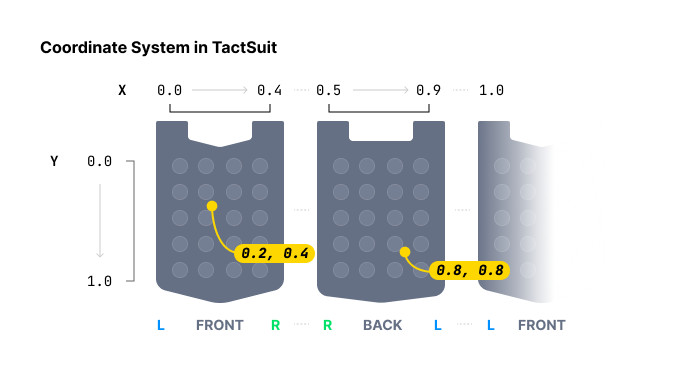
Play haptic around specific coordinates. Unlike playDot function, which specifies the haptic intensity for each haptic actuator individually, this method specify the haptic intensity for particular coordinates.
When specifying haptic position, playDot offers discrete control, while playPath is more continuous. playDot assigns intensity to individual actuators, whereas playPath allows intensity specification for specific coordinates (between 0 and 1 for both X and Y axis), causing nearby actuators to vibrate accordingly.
You can put multiple coordinates with multiple intensities. Note that all actuators around these coordinates in the array will activate simultaneously (at the same time), not sequentially. Moreover, the size of all arrays must be the same.
By continuously calling this function while gradually changing the values, you can achieve the effect of a moving haptic point.
Parameters
position: Type of haptic device to playback. See the table inplayDot.durationMillis: The duration of haptic, measured in millisecond. Greater than or equal to100is recommended.x: Array of X coordinates for the haptic effect. Each value must be in the range: [0.0-1.0]y: Array of Y coordinates for the haptic effect. Each value must be in the range: [0.0-1.0]intensity: Array of intensity values for each coordinate. The length must match the number of coordinates. Each value must be in the range: [0-100]
Returns
Request ID. You can use this to stop playback.
Example
// Path of point #1
let x1: [Float] = [0.738, 0.723, 0.709, 0.696, 0.682, 0.667, 0.653]
let y1: [Float] = [0.680, 0.715, 0.749, 0.782, 0.816, 0.852, 0.885]
// Path of point #2
let x2: [Float] = [0.061, 0.072, 0.102, 0.184, 0.254, 0.310, 0.363]
let y2: [Float] = [0.632, 0.587, 0.542, 0.498, 0.411, 0.366, 0.301]

for i in 0..<x1.count {
    // Point #1 and #2 will vibrate at the same time.
    kit.playPath(position: BhapticsPosition.Vest.index, durationMillis: 250, x: [x1[i], x2[i]], y: [y1[i], y2[i]], intensity: [20, 60])
    try await Task.sleep(nanoseconds: 250_000_000)
}
playGlove
@discardableResult
func playGlove(position: Int, points: [GlovePoint], frequency: Int, repeatCount: Int) -> Int
TactGlove Only. Play haptics in TactGlove. Unlike using playDot, you can finely adjust haptic duration and vibration intensity changes. This allows for even more detailed expression of haptic feedback.
Pass a GlovePoint for each motor you want to actuate. At least one point is required to work.
struct GlovePoint {
    var index: Int
    var intensity: Int
    var shape: Int
    var playTime: Int

    init(index: Int, intensity: Int, shape: Int = 0, playTime: Int = 0)
}
Parameters
-
position: Type of haptic device to playback. Use8or9only.Value Device 8TactGlove(Left) 9TactGlove(Right) -
points: Array ofGlovePoint.-
index: Index of the motor.Index Motor is positioned at… 0Tip of the thumb 1Tip of the index finger 2Tip of the middle finger 3Tip of the ring finger 4Tip of the little finger 5On the wrist 6On the palm (thumb side) 7On the palm (little finger side) -
intensity: Intensity of the motor. Valid range is: [0-100] -
playTime: Time interval for actuation.Value Playtimes 15ms 210ms 420ms 630ms 840ms -
shape: Form of haptic intensity change over time.Value Waveform 0Constant intensity for the duration 1Starts at the specified intensity and decreases by half 2Starts at half of the specified intensity and increases to the specified one.
-
-
frequency: Vibration frequency of the wrist motor, in Hz. Applies to TactGlove DK3 only. Pass0to use the default (80). -
repeatCount: Number of repetitions.
Returns
Request ID. You can use this to stop playback.
Example
let points = (0..<8).map { GlovePoint(index: $0, intensity: 100, shape: 2, playTime: 8) }

// Left hand
kit.playGlove(position: BhapticsPosition.GloveL.index, points: points, frequency: 0, repeatCount: 1)

// Right hand
kit.playGlove(position: BhapticsPosition.GloveR.index, points: points, frequency: 0, repeatCount: 1)
Playback Control
stopByRequestId
func stopByRequestId(_ requestId: Int)
Stop haptic playback by request ID.
Parameters
requestId: Request ID returned by the haptic playing function.
Example
let requestId = kit.play(eventId: "shoot")
try await Task.sleep(nanoseconds: 2_000_000_000)
kit.stopByRequestId(requestId)
stopByEventId
func stopByEventId(_ eventId: String)
Stop all haptic playback for a specific event name.
Parameters
eventId: Name of the haptic event you want to stop.
stopAll
func stopAll()
Stop all haptic currently playing.
pause
func pause(_ eventId: String)
Pause the playback of a specific event.
Parameters
eventId: Name of the haptic event you want to pause.
resume
func resume(_ eventId: String)
Resume the paused playback of a specific event.
Parameters
eventId: Name of the haptic event you want to resume.
turnOffMotors
func turnOffMotors()
Turn off the motors of all connected devices immediately.
Status Checking
isPlaying
func isPlaying() -> Bool
Checks the overall haptic playback status. Works whether event-based, or direct playing.
isPlayingByRequestId
func isPlayingByRequestId(_ requestId: Int) -> Bool
Checks the playback status of a specific request ID. Works whether event-based, or direct playing.
isPlayingByEventId
func isPlayingByEventId(_ eventId: String) -> Bool
Checks the playback status of a specific event.
getEventList
func getEventList() -> [String]
Returns the names of the haptic events in your haptic app. The list is available after initialize completes.
Device Management
On iOS and visionOS, the SDK scans and connects haptic devices over Bluetooth LE. On macOS, devices are managed by bHaptics Player: the scan and pair functions have no effect, while getDevices and ping work with the devices connected to bHaptics Player.
scan
func scan()
Start scanning for nearby bHaptics devices. Found devices are delivered to deviceStateUpdated. Paired devices are reconnected automatically when found.
Scanning starts only when Bluetooth is ready. Call this after bleStateChange reports true.
stopScan
func stopScan()
Stop scanning. Devices that are neither paired nor connected are removed from the device list.
isScanning
func isScanning() -> Bool
Checks whether the SDK is scanning.
toggleScanning
func toggleScanning() -> Bool
Stop scanning if the SDK is scanning, and start scanning otherwise.
Returns
Whether the SDK is scanning after the call.
pair
func pair(device: BhapticsDevice)
Pair and connect the device. The SDK remembers paired devices across app launches.
Parameters
device: Device to pair. Get it fromgetDevicesordeviceStateUpdated.
unpair
func unpair(device: BhapticsDevice)
Unpair and disconnect the device.
Parameters
device: Device to unpair.
getDevices
func getDevices() -> [BhapticsDevice]
Returns the found and paired devices. See BhapticsDevice.
ping
@discardableResult
func ping(device: String) -> Bool
Sends a ping to a specific device. The device vibrates briefly, so the user can identify it.
Parameters
device: Theuuidof the BhapticsDevice.
Returns
Whether the ping was sent.
Example
if let device = kit.getDevices().first {
    kit.ping(device: device.uuid)
}
pingAll
@discardableResult
func pingAll() -> Bool
Send a ping to all connected devices.
Returns
Whether the ping was sent.
getBluetoothState
func getBluetoothState() -> Int
Returns the Bluetooth state. Use this to tell why no devices are found.
| Value | State |
|---|---|
0 | Unknown |
1 | Resetting |
2 | Unsupported |
3 | Unauthorized (Bluetooth permission is denied) |
4 | Powered off |
5 | Powered on |
macOS Only
isPlayerConnected
func isPlayerConnected() -> Bool
Checks the connection status with bHaptics Player. Always returns false on iOS and visionOS.
onPlayerConnectionChanged
var onPlayerConnectionChanged: ((Bool) -> Void)?
Called on the main thread when the connection status with bHaptics Player changes. Available on macOS only.
Example
#if os(macOS)
kit.onPlayerConnectionChanged = { connected in
    print("bHaptics Player connected: \(connected)")
}
#endif
Types
BhapticsKitDelegate
protocol BhapticsKitDelegate {
    func bHapticsKit(_ kit: BhapticsKit, bleStateChange state: Bool)
    func bHapticsKit(_ kit: BhapticsKit, deviceStateUpdated devices: [BhapticsDevice])
    func bHapticsKit(_ kit: BhapticsKit, didConnect device: BhapticsDevice)
    func bHapticsKit(_ kit: BhapticsKit, didDisconnect device: BhapticsDevice)
}
Receives Bluetooth and device state changes on iOS and visionOS.
bleStateChange: Bluetooth became ready (true) or unavailable (false).deviceStateUpdated: The device list changed. Called when a device is found, paired, unpaired, connected, or disconnected.didConnect: A device is connected.didDisconnect: A device that is not paired is disconnected.
BhapticsDevice
Haptic device found by the SDK.
| Property | Type | Description |
|---|---|---|
name | String | Name of the device. |
uuid | String | Unique identifier of the device. Also available as id. |
position | PositionType | Body part the device is placed on. |
battery | Int | Battery level in percent. -1 if unknown. |
connected | Bool | Whether the device is connected. |
paired | Bool | Whether the device is paired. |
BhapticsPosition
Type of haptic device. Use index to pass it to functions such as playDot, playPath, and playGlove.
| Case | index | Device |
|---|---|---|
.Vest | 0 | TactSuit |
.ForearmL | 1 | TactSleeve(Left) |
.ForearmR | 2 | TactSleeve(Right) |
.Head | 3 | TactVisor |
.HandL | 4 | Tactosy for Hands(Left) |
.HandR | 5 | Tactosy for Hands(Right) |
.FootL | 6 | Tactosy for Feet(Left) |
.FootR | 7 | Tactosy for Feet(Right) |
.GloveL | 8 | TactGlove(Left) |
.GloveR | 9 | TactGlove(Right) |
let position = BhapticsPosition.GloveL.index // 8