参考
bhaptics_python 模块提供了从 Python 控制 bHaptics 触觉设备的函数。它使您能够播放触觉模式、直接控制设备马达,以及管理触觉播放。
import bhaptics_python
基于事件的触觉播放
播放绑定到特定事件的触觉模式(在 bHaptics Designer/Portal 中设计)。对于大多数应用程序,这些是推荐使用的函数。
play_event
async def bhaptics_python.play_event(event_name: str) -> int
async def bhaptics_python.play_event(event_name: str, device_index: int) -> int
播放预定义的触觉事件。
- 事件播放会作用于设备索引为默认值(
-1)的触觉设备。只需使用第一个参数——事件名称——即可。这可用于一般用途。 - 如果您想驱动特定的触觉设备,也可以使用第二个参数——设备索引。您可以在 bHaptics Player 中查看或设置设备索引。
参数
event_name:触觉事件的名称。device_index(可选):触觉设备的设备索引。
返回值
请求 ID。您可以用它来停止播放。失败时返回 -1。
示例
import bhaptics_python

async def play_example():
    request_id = await bhaptics_python.play_event("heartbeat")
    print(f"Playback request ID: {request_id}")
play_param
async def bhaptics_python.play_param(
    event_name: str,
    intensity: float,
    duration: float,
    x_offset: float,
    y_offset: float
) -> int
async def bhaptics_python.play_param(
    event_name: str,
    intensity: float,
    duration: float,
    x_offset: float,
    y_offset: float,
    device_index: int
) -> int
调整触觉的强度、Duration 和方向,并播放触觉事件。
参数
event_name:触觉事件的名称。intensity:触觉 Intensity 倍数。有效范围:[0.0-2.0](默认值:1.0)duration:Duration 倍数。(默认值:1.0)x_offset:将触觉逆时针旋转。有效范围:[0.0-360.0](默认值:0.0)y_offset:将触觉上移或下移。有效范围:[-0.5-0.5](默认值:0.0)device_index(可选):触觉设备的设备索引。
返回值
请求 ID。您可以用它来停止播放。失败时返回 -1。
示例
import bhaptics_python

async def play_params_example():
    request_id = await bhaptics_python.play_param(
        "pistol_r", 1.0, 1.0, 0.0, 0.0, 0
    )
play_loop
async def play_loop(
    event_name: str,
    intensity: float,
    duration: float,
    x_offset: float,
    y_offset: float,
    interval: int,
    max_count: int
) -> int
async def play_loop(
    event_name: str,
    intensity: float,
    duration: float,
    x_offset: float,
    y_offset: float,
    interval: int,
    max_count: int,
    device_index: int
) -> int
循环播放触觉事件。
参数
event_name:触觉事件的名称。intensity:触觉 Intensity 倍数。有效范围:[0.0-2.0](默认值:1.0)duration:Duration 倍数。(默认值:1.0)x_offset:将触觉逆时针旋转。有效范围:[0.0-360.0](默认值:0.0)y_offset:将触觉上移或下移。有效范围:[-0.5-0.5](默认值:0.0)interval:循环之间的时间间隔(以毫秒为单位)。max_count:循环次数。device_index(可选):触觉设备的设备索引。
返回值
请求 ID。您可以用它来停止播放。失败时返回 -1。
示例
import bhaptics_python

async def play_loop_example():
    result = await bhaptics_python.play_loop(
        "heartbeat", 0.8, 1000, 90, 0, 150, 5
    )
play_without_result
async def bhaptics_python.play_without_result(
    event_name: str,
    intensity: float,
    duration: float,
    x_offset: float,
    y_offset: float
)
async def bhaptics_python.play_without_result(
    event_name: str,
    intensity: float,
    duration: float,
    x_offset: float,
    y_offset: float,
    device_index: int
)
在不等待结果的情况下播放触觉事件(fire-and-forget)。
参数
event_name:触觉事件的名称。intensity:触觉 Intensity 倍数。有效范围:[0.0-2.0](默认值:1.0)duration:Duration 倍数。(默认值:1.0)x_offset:将触觉逆时针旋转。有效范围:[0.0-360.0](默认值:0.0)y_offset:将触觉上移或下移。有效范围:[-0.5-0.5](默认值:0.0)device_index(可选):触觉设备的设备索引。
示例
import bhaptics_python

async def play_without_result_example():
    await bhaptics_python.play_without_result(
        "heartbeat", 0.8, 1.0, 90, 0.25
    )
直接播放触觉
如果您想在不使用事件的情况下播放触觉,请使用这些函数。
play_dot
async def bhaptics_python.play_dot(
    position: int,
    duration_millis: int,
    values: list[int]
) -> int
async def bhaptics_python.play_dot(
    position: int,
    duration_millis: int,
    values: list[int],
    device_index: int
) -> int
在特定的触觉执行器上播放触觉反馈。
参数
position:要播放的触觉设备类型。Value Device 0TactSuit Pro 1TactSleeve(Left) 2TactSleeve(Right) 3TactVisor 4Tactosy for Hands(Left) 5Tactosy for Hands(Right) 6Tactosy for Feet(Left) 7Tactosy for Feet(Right) 8TactGlove(Left) 9TactGlove(Right) duration_millis:触觉的 Duration(以毫秒为单位)。建议大于或等于100。values:根据设备的马达数量来指定列表的长度。列表中的值表示马达的 Intensity。列表中每个值的有效范围:[0-100]device_index(可选):触觉设备的设备索引。
示例
import bhaptics_python

async def play_dot_example():
    # Sequentially activate 32 motors
    motor_len = 32
    values = [0 for _ in range(motor_len)]

    for i in range(motor_len):
        values[i] = 50
        if i > 0:
            values[i - 1] = 0

        request_id = await bhaptics_python.play_dot(0, 500, values)
        time.sleep(0.5)
play_path
async def bhaptics_python.play_path(
    position: int,
    duration_millis: int,
    x: list[float],
    y: list[float],
    intensity: list[int]
) -> int
async def bhaptics_python.play_path(
    position: int,
    duration_millis: int,
    x: list[float],
    y: list[float],
    intensity: list[int],
    device_index: int
) -> int
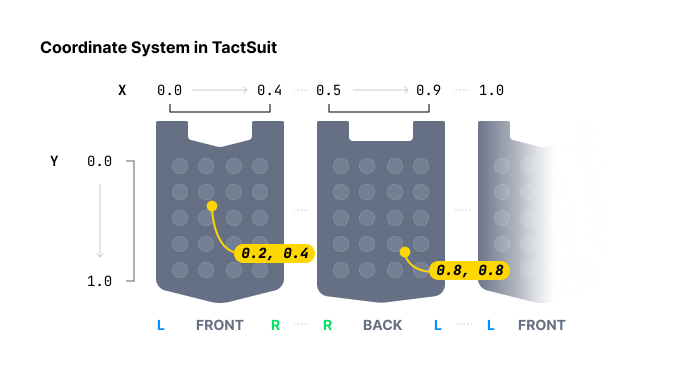
在特定坐标周围播放触觉。与逐个为每个触觉执行器指定触觉 Intensity 的 play_dot 函数不同,此方法为特定坐标指定触觉 Intensity。
在指定触觉位置时,play_dot 提供离散控制,而 play_path 则更为连续。play_dot 为单个执行器分配 Intensity,而 play_path 允许为特定坐标(X 轴和 Y 轴均在 0 到 1 之间)指定 Intensity,从而使附近的执行器相应地振动。
您可以放入多个坐标和多个 Intensity。请注意,列表中这些坐标周围的所有执行器都会**同时(在同一时间)**激活,而不是依次激活。此外,所有列表的大小必须相同。
通过在逐渐改变值的同时持续调用此函数,您可以实现触觉点移动的效果。
参数
position:要播放的触觉设备类型。有关更多信息,请参考此处。Value Device Motors Count 0TactSuit Pro 32 1TactSleeve(Left) 3 2TactSleeve(Right) 3 3TactVisor 4 4Tactosy for Hands(Left) 3 5Tactosy for Hands(Right) 3 6Tactosy for Feet(Left) 3 7Tactosy for Feet(Right) 3 8TactGlove(Left) 8 9TactGlove(Right) 8 duration_millis:触觉的 Duration(以毫秒为单位)。建议大于或等于100。x:触觉效果的 X 坐标列表。每个值必须在范围内:[0.0-1.0]y:触觉效果的 Y 坐标列表。每个值必须在范围内:[0.0-1.0]intensity:每个坐标的 Intensity 值列表。长度必须与坐标数量一致。每个值必须在范围内:[0-100]device_index(可选):触觉设备的设备索引。
示例
import bhaptics_python
import time

async def play_path_example():
    # Path of point #1
    x1 = [0.738, 0.723, 0.709, 0.696, 0.682, 0.667, 0.653]
    y1 = [0.680, 0.715, 0.749, 0.782, 0.816, 0.852, 0.885]
    intensity1 = [20] * len(x1)
    # Path of point #2
    x2 = [0.061, 0.072, 0.102, 0.184, 0.254, 0.310, 0.363]
    y2 = [0.632, 0.587, 0.542, 0.498, 0.411, 0.366, 0.301]
    intensity2 = [60] * len(x2)

    for i in range(len(x1)):
        # Point #1 and #2 will vibrate at the same time.
        await bhaptics_python.play_path(0, 250, [x1[i], x2[i]], [y1[i], y2[i]], [intensity1[i], intensity2[i]])
        time.sleep(0.25)
play_glove
async def bhaptics_python.play_glove(
    position: int,
    motors: list[int],
    playtimes: list[int],
    shapes: list[int],
    repeat_count: int
) -> int
仅限 TactGlove。 在 TactGlove 上播放触觉。与使用 play_dot 不同,您可以精细地调整触觉 Duration 和振动 Intensity 的变化。这样可以更详细地表现触觉反馈。
每个列表必须有八个元素,且至少需要一个元素才能工作。
参数
-
position:要播放的触觉设备类型。仅使用8或9。Value Device 8TactGlove(Left) 9TactGlove(Right) -
motors:由八个元素组成的列表,每个元素表示一个马达的 Intensity。由于一个 TactGlove 中有八个马达,列表的长度必须为八。列表中每个值的有效范围:[0-100]List Index 马达所在位置… 0拇指尖 1食指尖 2中指尖 3无名指尖 4小指尖 5手腕处 6手掌(拇指侧) 7手掌(小指侧) -
playtimes:由八个元素组成的列表,每个元素表示一个作动的时间间隔。Value Playtimes 15ms 210ms 420ms 630ms 840ms -
shapes:由八个元素组成的列表,每个元素表示触觉 Intensity 随时间变化的形态。Value Waveform 0在该 Duration 内保持恒定 Intensity 1从指定的 Intensity 开始并减小一半 2从指定 Intensity 的一半开始并增大至指定值。 -
repeat_count:重复次数。
示例
import bhaptics_python
import time

async def play_glove_example():
    motors = [100] * 8
    playtimes = [8] * 8
    shapes = [2] * 8

    # Left hand
    for _ in range(3):
        await bhaptics_python.play_glove(8, motors, playtimes, shapes, 0)
        time.sleep(0.3)

    # Right hand
    for _ in range(3):
        await bhaptics_python.play_glove(9, motors, playtimes, shapes, 0)
        time.sleep(0.3)
播放控制
stop_by_request_id
async def bhaptics_python.stop_by_request_id(request_id: int)
通过请求 ID 停止触觉播放。
参数
request_id:触觉播放函数返回的请求 ID。
示例
import bhaptics_python
import asyncio

async def stop_by_id_example():
    request_id = await bhaptics_python.play_event("shoot")
    await asyncio.sleep(2)
    await bhaptics_python.stop_by_request_id(request_id)
stop_by_event_name
async def bhaptics_python.stop_by_event_name(event_name: str)
停止特定事件名称的所有触觉播放。
参数
event_name:您想要停止的触觉事件的名称。
示例
import bhaptics_python
import asyncio

async def stop_by_name_example():
    await bhaptics_python.play_event("shoot")
    await asyncio.sleep(2)
    await bhaptics_python.stop_by_event_name("shoot")
stop_all
async def bhaptics_python.stop_all()
停止当前正在播放的所有触觉。
生命周期
registry_and_initialize
async def bhaptics_python.registry_and_initialize(
    app_id: str,
    api_key: str,
    default_config: str
) -> bool
初始化触觉环境。它会初始化 SDK 并建立与 bHaptics Player 的连接。在使用触觉相关函数之前,应调用此函数。
参数
app_id:在 bHaptics Developer Portal 中创建的应用程序 ID。api_key:在 bHaptics Developer Portal 中创建的 API 密钥。default_config:传入一个空字符串("")。
返回值
初始化是否成功。
示例
import bhaptics_python
import asyncio

async def main():
    app_id = "your_app_id"    # App ID created in bHaptics Developer Portal
    api_key = "your_api_key"  # API key created in bHaptics Developer Portal

    # Initialize SDK
    result = await bhaptics_python.registry_and_initialize(app_id, api_key, "")
    print(f"Initialization result: {result}")

asyncio.run(main())
close
async def bhaptics_python.close()
关闭 SDK 连接。
状态检查
is_playing_event_by_request_id
async def bhaptics_python.is_playing_event_by_request_id(request_id: int) -> bool
检查特定请求 ID 的播放状态。无论是基于事件的播放还是直接播放都有效。
is_playing_event_by_event_id
async def bhaptics_python.is_playing_event_by_event_id(event_name: str) -> bool
检查特定事件的播放状态。
is_playing_event
async def bhaptics_python.is_playing_event() -> bool
检查整体触觉播放状态。无论是基于事件的播放还是直接播放都有效。
is_bhaptics_device_connected
async def bhaptics_python.is_bhaptics_device_connected(position: int) -> bool
检查特定位置设备的连接状态。
参数
position:要检查的触觉设备类型。Value Device 0TactSuit Pro 1TactSleeve(Left) 2TactSleeve(Right) 3TactVisor 4Tactosy for Hands(Left) 5Tactosy for Hands(Right) 6Tactosy for Feet(Left) 7Tactosy for Feet(Right) 8TactGlove(Left) 9TactGlove(Right)
示例
import bhaptics_python

# Check connection status for all positions
async def check_all_positions_example():
    for i in range(10):
        is_device_connected = await bhaptics_python.is_bhaptics_device_connected(i)
        print(f"Position {i} device connection: {is_device_connected}")
设备控制
设备控制函数使您能够直接管理已连接的触觉设备并与之交互,例如发送 ping、设置振动强度或交换设备位置。
ping
async def bhaptics_python.ping(device_address: str)
向特定设备发送 ping。
参数
device_address:触觉设备的 MAC 地址。使用get_device_info_json获取该地址。
示例
import bhaptics_python
import json

async def ping_first_device_example():
    device_info_string = await bhaptics_python.get_device_info_json()
    device_info_list = json.loads(device_info_string)

    if len(device_info_list) > 0:
        bhaptics_python.ping(device_info_list[0]['address'])
ping_all
async def bhaptics_python.ping_all()
向所有已连接的设备发送 ping。
set_device_vsm
async def bhaptics_python.set_device_vsm(device_address: str, value: int)
设置设备的 VSM(Vibration Strength Multiplier)值。
参数
device_address:触觉设备的 MAC 地址。使用get_device_info_json获取该地址。value:VSM(Vibration Strength Multiplier)值。默认 VSM 为100(x1.00 反馈 Intensity)。有效范围:[0-200]
示例
import bhaptics_python
import json

async def set_first_device_esm_example():
    device_info_string = await bhaptics_python.get_device_info_json()
    device_info_list = json.loads(device_info_string)

    if len(device_info_list) > 0:
        bhaptics_python.set_device_vsm(device_info_list[0]['address'], 100)
swap_position
async def bhaptics_python.swap_position(device_address: str)
在左右之间交换设备的位置。
可以交换位置的设备有:
- Tactosy for Feet
- Tactosy for Hands
参数
device_address:触觉设备的 MAC 地址。使用get_device_info_json获取该地址。
示例
import bhaptics_python
import json

async def swap_first_device_example():
    device_info_string = await bhaptics_python.get_device_info_json()
    device_info_list = json.loads(device_info_string)

    if len(device_info_list) > 0:
        # Swap the position of the first device
        await bhaptics_python.swap_position(device_info_list[0]['address'])
信息检索
get_device_info_json
await bhaptics_python.get_device_info_json() -> str
以 JSON 格式返回已连接设备的信息。
返回值
以 JSON 格式包含设备信息的字符串。
以下是在连接了两个触觉设备的环境中返回的字符串示例。
[
  {
    "position": 0,
    "deviceName": "TactSuitPro",
    "address": "UNIQUE_ADDRESS_GOES_HERE",
    "connected": true,
    "paired": true,
    "battery": 72,
    "audioJackIn": false,
    "vsm": 20
  },
  {
    "position": 3,
    "deviceName": "TactVisor",
    "address": "UNIQUE_ADDRESS_GOES_HERE",
    "connected": true,
    "paired": true,
    "battery": 85,
    "audioJackIn": false,
    "vsm": 20
  }
]
示例
import bhaptics_python
import json

async def device_count_example():
    device_info_string = await bhaptics_python.get_device_info_json()
    device_info_list = json.loads(device_info_string)

    print(f"Connected device count: {len(device_info_list)}")