Class BhapticsLibrary
BhapticsLibrary 类包含用于使用 bHaptics 触觉设备的函数。
参考
- 路径: Assets\Bhaptics\SDK2\Scripts\Core\Plugins\BhapticsLibrary.cs
静态函数 — 播放事件驱动的触觉
播放绑定到 Designer/Portal 中创建的特定触觉事件的触觉模式。我们强烈推荐使用这些函数。
Play
public static int Play(string eventId, int startMillis = 0, float intensity = 1f, float duration = 1.0f, float angleX = 0.0f, float offsetY = 0.0f, int requestId = -1);
在调整触觉的强度、Duration 和方向的同时播放触觉事件。
Parameters
string eventId: 要播放的触觉事件的名称。int startMillis: 播放开始位置(以毫秒为单位)。事件开头的startMillis毫秒会被跳过(这是起始 Offset,而非播放前的延迟)。默认值为0。仅限 Windows/macOS/Android。float intensity: 触觉 Intensity 将乘以此值。float duration: 触觉 Duration 将乘以此值。float angleX: 以全局Vector3.up为中心逆时针旋转触觉。有效范围: [0.0f-360.0f]float offsetY: 将触觉向上或向下移动。有效范围: [-0.5f-0.5f]int requestId: 指定一个 Request ID,而不是使用随机 ID。有效值为0或更大。如果省略或为负数,则会分配随机 ID。重复使用 Request ID
通常,如果在另一个触觉仍在播放时播放触觉,新的播放会叠加在当前播放之上运行。但是,如果使用与当前触觉相同的
eventId和requestId进行播放,当前播放会停止,新的播放会开始。这样在以较短间隔重复播放时,每个触觉的感觉会更加清晰,并能防止触觉叠加。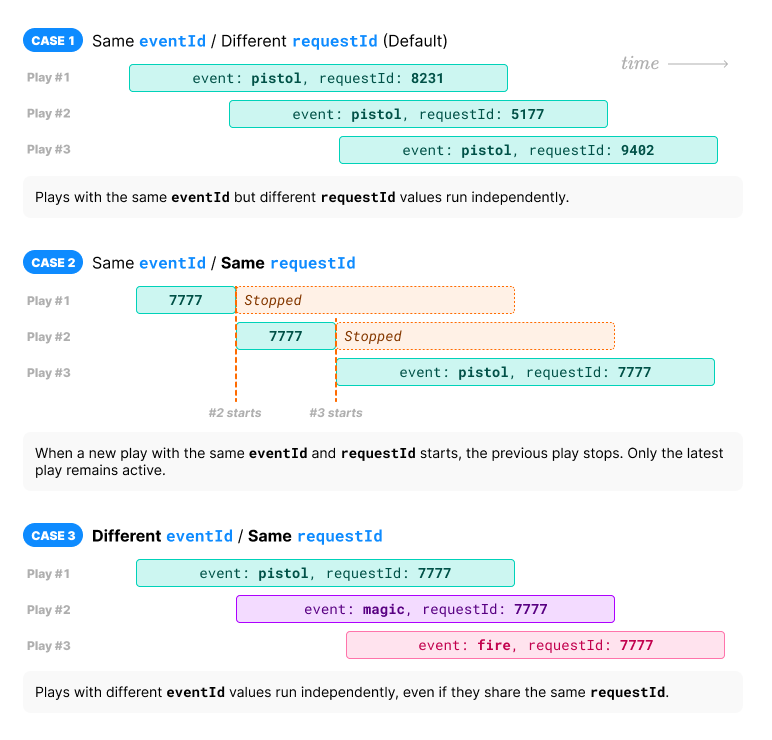
Returns
请求 ID。您可以使用该请求 ID 停止触觉。返回失败时返回 -1。
但是连接到 Hub 时,由于 Hub 不提供返回值,因此失败的调用不会返回 -1。
Example
using Bhaptics.SDK2;

public class Example : MonoBehaviour
{
    private void OnShoot()
    {
        // Assume the event name is "shootpistol"

        // BASIC USAGE
        BhapticsLibrary.Play(BhapticsEvent.SHOOTPISTOL);
        // or
        BhapticsLibrary.Play("shootpistol");

        // ADVANCED USAGE
        BhapticsLibrary.Play(
            BhapticsEvent.SHOOTPISTOL, // Haptic name
            0,      // Playback start position (millisecond)
            1.0f,   // Haptic intensity
            1.0f,   // Haptic duration
            20.0f,  // Rotate haptic around global Vector3.up (0f - 360f)
            0.3f    // Move haptic up or down (-0.5f - 0.5f)
        );

        // CUSTOM REQUEST ID
        BhapticsLibrary.Play(BhapticsEvent.SHOOTPISTOL, requestId: 1001);
    }
}
PlayParam
public static int PlayParam(string eventId, float intensity = 1.0f, float duration = 1.0f, float angleX = 0.0f, float offsetY = 0.0f, int requestId = -1);
在调整触觉的强度、Duration 和方向的同时播放触觉事件。
Parameters
string eventId: 要播放的触觉事件的名称。float intensity: 触觉 Intensity 将乘以此值。float duration: 触觉 Duration 将乘以此值。float angleX: 以全局Vector3.up为中心逆时针旋转触觉。有效范围: [0.0f-360.0f]float offsetY: 将触觉向上或向下移动。有效范围: [-0.5f-0.5f]int requestId: 指定一个 Request ID,而不是使用随机 ID。有效值为0或更大。如果省略或为负数,则会分配随机 ID。重复使用 Request ID
通常,如果在另一个触觉仍在播放时播放触觉,新的播放会叠加在当前播放之上运行。但是,如果使用与当前触觉相同的
eventId和requestId进行播放,当前播放会停止,新的播放会开始。这样在以较短间隔重复播放时,每个触觉的感觉会更加清晰,并能防止触觉叠加。
Returns
请求 ID。您可以使用该请求 ID 停止触觉。返回失败时返回 -1。
但是连接到 Hub 时,由于 Hub 不提供返回值,因此失败的调用不会返回 -1。
Example
using Bhaptics.SDK2;

public class Example : MonoBehaviour
{
    private void OnShoot()
    {
        BhapticsLibrary.PlayParam(
            BhapticsEvent.SHOOTPISTOL, // Haptic name
            1.0f,   // Haptic intensity
            1.0f,   // Haptic duration
            20.0f,  // Rotate haptic around global Vector3.up (0f - 360f)
            0.3f    // Move haptic up or down (-0.5f - 0.5f)
        );
    }
}
PlayAngle
public static int PlayAngle(string eventId, float angleX, float offsetY);
在调整触觉方向的同时播放触觉事件。这是将 intensity 和 duration 固定为 1.0f 的 PlayParam 便捷封装。
Parameters
string eventId: 要播放的触觉事件的名称。float angleX: 以全局Vector3.up为中心逆时针旋转触觉。有效范围: [0.0f-360.0f]float offsetY: 将触觉向上或向下移动。有效范围: [-0.5f-0.5f]
Returns
请求 ID。您可以使用该请求 ID 停止触觉。返回失败时返回 -1。
但是连接到 Hub 时,由于 Hub 不提供返回值,因此失败的调用不会返回 -1。
PlayLoop
public static int PlayLoop(
    string eventId,
    float intensity = 1.0f,
    float duration = 1.0f,
    float angleX = 0.0f,
    float offsetY = 0.0f,
    int interval = 200,
    int maxCount = 999999
);
重复播放触觉。此外,与 PlayHapticWithOption 函数一样,您可以调整触觉的强度、Duration 和方向。
Parameters
string eventId: 要播放的触觉事件的名称。float intensity: 触觉 Intensity 将乘以此值。float duration: 触觉 Duration 将乘以此值。float angleX: 以全局Vector3.up为中心逆时针旋转触觉。有效范围: [0.0f-360.0f]float offsetY: 将触觉向上或向下移动。有效范围: [-0.5f-0.5f]int interval: 循环之间的时间间隔(以毫秒为单位)。int maxCount: 循环次数。
Returns
请求 ID。您可以使用该请求 ID 停止触觉。返回失败时返回 -1。
但是连接到 Hub 时,由于 Hub 不提供返回值,因此失败的调用不会返回 -1。
Example
using Bhaptics.SDK2;

public class Example : MonoBehaviour
{
    private void OnShoot()
    {
        BhapticsLibrary.PlayLoop(
            BhapticsEvent.SHOOTPISTOL, // Haptic name
            1.0f,   // Haptic intensity
            1.0f,   // Haptic duration
            20.0f,  // Rotate haptic around global Vector3.up (0f - 360f)
            0.3f,   // Move haptic up or down (-0.5f - 0.5f)
            200,    // Loop interval time (millisecond)
            999999  // Loop count
        );
    }
}
PlayLoopOnly
public static int PlayLoopOnly(string eventId, int interval = 200, int maxCount = 999999);
重复播放触觉。这是将 intensity 和 duration 固定为 1.0f 且不进行方向调整的 PlayLoop 便捷封装。
Parameters
string eventId: 要播放的触觉事件的名称。int interval: 循环之间的时间间隔(以毫秒为单位)。int maxCount: 循环次数。
Returns
请求 ID。您可以使用该请求 ID 停止触觉。返回失败时返回 -1。
但是连接到 Hub 时,由于 Hub 不提供返回值,因此失败的调用不会返回 -1。
静态函数 — 直接播放触觉
如果您想在不创建新事件的情况下播放触觉,请使用这些函数。
PlayMotors
public static int PlayMotors(int position, int[] motors, int durationMillis);
在特定触觉执行器上播放触觉反馈。无需创建事件即可使用此函数。
Parameters
int position: 触觉设备的类型。更多信息请参阅此处。值 设备 等同于… 电机数 0TactSuit Pro PositionType.Vest32 1TactSleeve(Left) PositionType.ForearmL3 2TactSleeve(Right) PositionType.ForearmR3 3TactVisor PositionType.Head4 4Tactosy for Hands(Left) PositionType.HandL3 5Tactosy for Hands(Right) PositionType.HandR3 6Tactosy for Feet(Left) PositionType.FootL3 7Tactosy for Feet(Right) PositionType.FootR3 8TactGlove(Left) PositionType.GloveL8 9TactGlove(Right) PositionType.GloveR8 int[] motors: 根据设备的电机数量指定数组的长度。数组中的值表示电机的 Intensity。数组中每个值的有效范围: [0-100]int durationMillis: 触觉的 Duration(以毫秒为单位)。建议大于或等于100。
Returns
请求 ID。您可以使用该请求 ID 停止触觉。返回失败时返回 -1。
但是连接到 Hub 时,由于 Hub 不提供返回值,因此失败的调用不会返回 -1。
Example
using Bhaptics.SDK2;

public class Example : MonoBehaviour
{
    private void OnCall()
    {
        // TactSuit Pro has 32 motors, so length of array should be 32 too.
        int[] MotorValueArray = new int[] {
            50, 40, 30, 20, 10, 50, 40, 30,
            50, 40, 30, 20, 10, 50, 40, 30,
            50, 40, 30, 20, 10, 50, 40, 30,
            50, 40, 30, 20, 10, 50, 40, 30,
        };

        BhapticsLibrary.PlayMotors(
            (int)PositionType.Vest, // Device type
            MotorValueArray,        // Haptic intensities
            500                     // Haptic duration (millisecond)
        );
    }
}
PlayWaveform
public static int PlayWaveform(
    PositionType positionType,
    int[] motorValues,
    GlovePlayTime[] playTimeValues,
    GloveShapeValue[] shapeValues,
    int frequency = 80,
    int repeatCount = 0
);
仅限 TactGlove。 在 TactGlove 中播放触觉。与使用 PlayMotors 不同,您可以精细地调整触觉 Duration 和振动 Intensity 的变化。这样可以更加细腻地表现触觉反馈。
每个数组(motorValues、playTimeValues、shapeValues)对于 TactGlove DK2 必须有六个元素,对于 TactGlove DK3 必须有八个元素,并且这三个数组的长度必须相同。任何其他长度都会返回 -1。
Parameters
-
PositionType positionType: 触觉设备的类型。值 设备 等同于… PositionType.GloveLTactGlove(Left) 8PositionType.GloveRTactGlove(Right) 9 -
int[] motorValues: 表示每个电机 Intensity 的数组。其长度必须与 TactGlove 的电机数量一致:六个(TactGlove DK2)或八个(TactGlove DK3)。数组索引6和7(见下表)处的手掌电机仅在 DK3 上存在。数组中每个值的有效范围: [0-100]数组索引 电机位置 0拇指指尖 1食指指尖 2中指指尖 3无名指指尖 4小指指尖 5手腕上 6手掌(拇指侧) 7手掌(小指侧) -
GlovePlayTime[] playTimeValues: 与motorValues长度相同的数组(DK2 为六个,DK3 为八个),每个元素表示一个作动的时间间隔,时间使用GlovePlayTime枚举定义。值 Duration 等同于… GlovePlayTime.NoneNone 0GlovePlayTime.FiveMS5ms 1GlovePlayTime.TenMS10ms 2GlovePlayTime.TwentyMS20ms 4GlovePlayTime.ThirtyMS30ms 6GlovePlayTime.FortyMS40ms 8 -
GloveShapeValue[] shapeValues: 与motorValues长度相同的数组(DK2 为六个,DK3 为八个),每个元素表示触觉 Intensity 随时间变化的形态,由GloveShapeValue枚举指定。值 波形 等同于… GloveShapeValue.Constant在 Duration 期间保持恒定的 Intensity 0GloveShapeValue.Decreasing从指定的 Intensity 开始并减小一半 1GloveShapeValue.Increasing从指定 Intensity 的一半开始并增加到指定值。 2[TactGlove DK3] 在 DK3 手套上,手腕执行器(数组索引
5)是音圈电机(VCM),不反映shapeValues。其余七个电机应用波形形态的方式与 DK2 手套相同。 -
int frequency: [仅限 TactGlove DK3] DK3 手套自身执行器的振动频率(Hz)。默认值为80。这仅影响 DK3 手套本身,不会更改任何其他已连接设备的工作频率。它对 DK2 手套或通用(非 Windows/macOS)路径没有影响。仅限 Windows/macOS。 -
int repeatCount: 重复波形的次数,从1开始计数。0表示播放一次。仅限 Windows/macOS。
Returns
请求 ID。您可以使用该请求 ID 停止触觉。返回失败时返回 -1。
但是连接到 Hub 时,由于 Hub 不提供返回值,因此失败的调用不会返回 -1。
Example
using Bhaptics.SDK2;

public class TestHaptic : MonoBehaviour
{
    public void OnCall()
    {
        int[] motorValues = new int[8] { 50, 80, 100, 0, 0, 0, 0, 0 };

        GlovePlayTime[] playTimeValues = new GlovePlayTime[8] {
            GlovePlayTime.FiveMS, GlovePlayTime.TwentyMS,
            GlovePlayTime.ThirtyMS, GlovePlayTime.None,
            GlovePlayTime.None, GlovePlayTime.None,
            GlovePlayTime.None, GlovePlayTime.None
        };

        GloveShapeValue[] shapeValues = new GloveShapeValue[8] {
            GloveShapeValue.Constant, GloveShapeValue.Decreasing,
            GloveShapeValue.Increasing, GloveShapeValue.Constant,
            GloveShapeValue.Constant, GloveShapeValue.Constant,
            GloveShapeValue.Constant, GloveShapeValue.Constant
        };

        BhapticsLibrary.PlayWaveform(
            PositionType.GloveL,    // Device Type
            motorValues,            // Intensities
            playTimeValues,         // Intervals
            shapeValues             // Intensity changing forms
        );
    }
}
PlayPath
public static int PlayPath(
    int position,
    float[] xValues,
    float[] yValues,
    int[] intensityValues,
    int duration
);
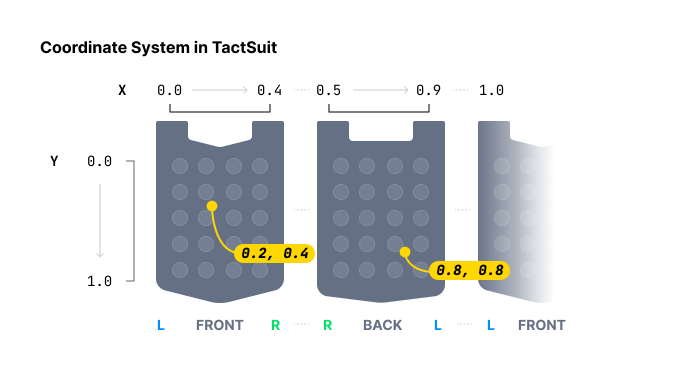
在特定坐标周围播放触觉。与为每个触觉执行器单独指定触觉 Intensity 的 PlayMotors 函数不同,此方法为特定坐标指定触觉 Intensity。
在指定触觉位置时,PlayMotors 提供离散的控制,而 PlayPath 则更为连续。PlayMotors 为各个执行器分配 Intensity,而 PlayPath 允许为特定坐标(X 轴和 Y 轴均在 0 到 1 之间)指定 Intensity,从而使附近的执行器相应地振动。
您可以放入多个带有多个 Intensity 的坐标。请注意,数组中这些坐标周围的所有执行器将**同时(在同一时刻)**作动,而非顺序作动。此外,所有数组的大小必须相同。
通过在逐渐改变值的同时持续调用此函数,您可以实现触觉点移动的效果。
[TactGlove DK3] PlayPath 不驱动 DK3 手套上的手腕音圈电机(VCM)。
Parameters
int position: 触觉设备的类型。值 设备 等同于… 0TactSuit Pro PositionType.Vest1TactSleeve(Left) PositionType.ForearmL2TactSleeve(Right) PositionType.ForearmR3TactVisor PositionType.Head4Tactosy for Hands(Left) PositionType.HandL5Tactosy for Hands(Right) PositionType.HandR6Tactosy for Feet(Left) PositionType.FootL7Tactosy for Feet(Right) PositionType.FootR8TactGlove(Left) PositionType.GloveL9TactGlove(Right) PositionType.GloveRfloat[] xValues: 指定 X 坐标。数组中每个值的有效范围: [0.0f-1.0f]float[] yValues: 指定 Y 坐标。数组中每个值的有效范围: [0.0f-1.0f]int[] intensityValues: 根据坐标的数量指定数组的长度。数组中的值表示坐标的 Intensity。数组中每个值的有效范围: [0-100]int duration: 触觉的 Duration(以毫秒为单位)。建议大于或等于100。
Returns
请求 ID。您可以使用该请求 ID 停止触觉。返回失败时返回 -1。
但是连接到 Hub 时,由于 Hub 不提供返回值,因此失败的调用不会返回 -1。
Example
using Bhaptics.SDK2;

/* Assumption:
    - For TactSuit Pro
    - Coordinate with Intensity
    - (X: 0.1, Y: 0.2) Intensity 40
    - (X: 0.3, Y: 0.4) Intensity 80
    - (X: 0.5, Y: 0.6) Intensity 10
  - Duration 500ms(=0.5 second)
*/
public class TestHaptic : MonoBehaviour
{
    public void OnCall()
    {
        BhapticsLibrary.PlayPath(
            (int)PositionType.Vest,           // Device type
            new float[] { 0.1f, 0.3f, 0.5f }, // X Coordinates
            new float[] { 0.2f, 0.4f, 0.6f }, // Y Coordinates
            new int[] { 40, 80, 10 },         // Intensities
            500                               // Duration
        );
    }
}
静态函数 — 其他
using Bhaptics.SDK2;

public class TestHaptic : MonoBehaviour
{
    public void OnCall()
    {
        int requestID = BhapticsLibrary.Play("TestHaptic");

        if (BhapticsLibrary.IsPlayingByEventId("TestHaptic"))
        {
            BhapticsLibrary.StopByEventId("TestHaptic");
        }

        if (BhapticsLibrary.IsPlayingByRequestId(requestID))
        {
            BhapticsLibrary.StopInt(requestID);
        }

        if (BhapticsLibrary.IsPlaying())
        {
            BhapticsLibrary.StopAll();
        }
    }
}
StopByEventId
public static bool StopByEventId(string eventId)
通过事件 ID 停止触觉事件。返回停止是否成功。
StopInt
public static bool StopInt(int requestId)
使用执行触觉的函数返回的请求 ID 停止触觉事件。返回停止是否成功。
StopAll
public static bool StopAll()
停止当前正在播放的所有触觉。返回停止是否成功。
IsPlaying
public static bool IsPlaying()
检查当前是否有任何触觉正在播放。
IsPlayingByEventId
public static bool IsPlayingByEventId(string eventId)
检查与此事件 ID 对应的触觉事件当前是否正在播放。
IsPlayingByRequestId
public static bool IsPlayingByRequestId(int requestId)
检查与此请求 ID 对应的触觉事件当前是否正在播放。
PauseByEventId
public static void PauseByEventId(string eventId)
暂停正在进行的触觉事件。使用 PauseByEventId(string eventId) 暂停特定的触觉事件。暂停的事件之后可以使用 ResumeByEventId(string eventId) 恢复。
ResumeByEventId
public static void ResumeByEventId(string eventId)
恢复已暂停的触觉事件。使用 ResumeByEventId(string eventId) 从暂停的位置恢复播放。